Cliqer Remote App
Cliqer Remote is the free app for Cliqer rooms, on phones, tablets and watches. It does three jobs:
- Presenter remote (iPhone, iPad and Android). Join a room by code, QR code or link, then click through slides, read your notes, watch the shared screen, point a laser, draw, chat with the host and call in on camera. See Join a room and Presenter tools.
- Remote for the host (iPhone, iPad and Android). Pair a device with the computer that runs Cliqer by scanning its QR code, then run the show from it: the presenter list, the timer, the room link, Studio and the host's settings. See Control the host.
- Slide clicker on your wrist (Apple Watch and Wear OS). Next and Back, the slide number and the timer, linked to your phone or on their own with a room code. See Watch apps.
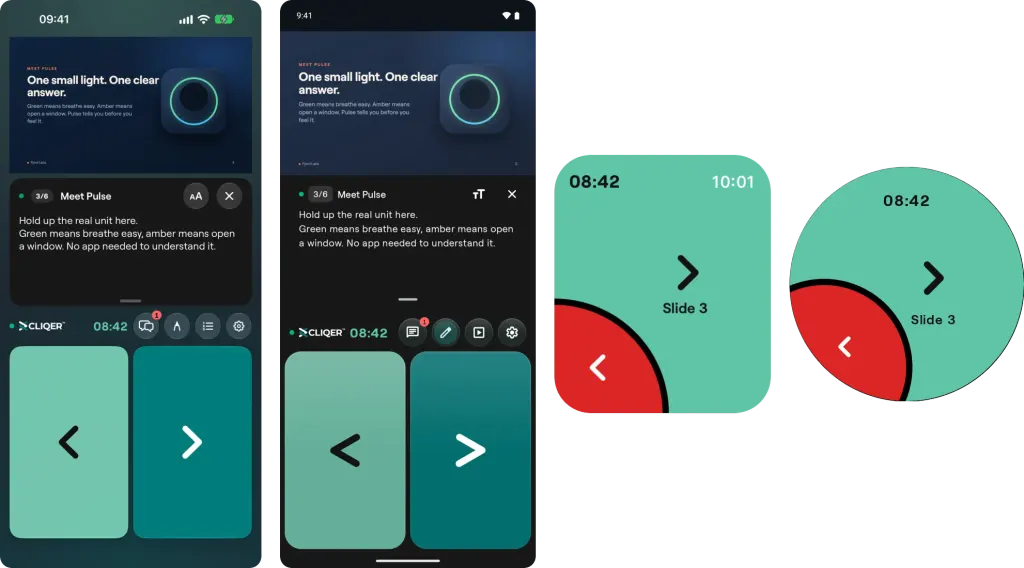
The same room on four devices: iPhone, Android phone, Apple Watch and Wear OS. Every one has big Back and Next buttons; the phones add the notes, the room tools and the shared screen.
What you need
| iPhone and iPad | Android | Apple Watch | Wear OS | |
|---|---|---|---|---|
| System | iOS 26 or later | Android 8 or later | watchOS 27 or later | Wear OS 3 or later |
| Presenter remote | Yes | Yes | Next, Back, slide number and timer | Next, Back, slide number and timer |
| Control the host | Yes | Android 11 or later | No | No |
| Cost | Free | Free | Free | Free |
| Language | English | English | English | English |
You do not need an account to join a room from the app. The host needs the Cliqer desktop app on the computer that runs the slides.
Install
Search for Cliqer Remote in the App Store or on Google Play. The buttons on the Cliqer Remote page open the right listing for your phone.
The Apple Watch app comes with Cliqer Remote for iPhone, and the Wear OS app with the Android listing. See Watch apps.
The first time you open the app it shows a short guide, "How Cliqer works". You can open it again from the Help menu on the Join screen, which also has links to the privacy policy and account deletion.
Plans
The app itself is free and has no in-app purchases. What a room allows is set by the host plan:
- A phone that joins as a presenter takes one of the room people places, the same as a browser presenter. A room on the Free plan allows one connected presenter, and paid plans lift that. See Pricing.
- Calling in on camera and the Studio controls in Control my computer need a host plan with callers, which starts at Pro. See Studio.
- Pairing a device with a computer needs no particular plan.
- A watch linked to your phone clicks through it, so it does not take a place of its own. A watch that joins a room on its own takes a presenter place, like a phone.
In this section
Studio
Cliqer Studio is the vision mixer in the desktop app. Stage inputs on Preview, take them to Program, and route displays, cameras, NDI sources and remote callers to your room and to your production software.
Join a Room
Join a Cliqer room from the Cliqer Remote app by room code, by scanning the QR code on the host screen, or by opening the room link.