API and integrations
Every room has an HTTP API. Start and stop timers, show messages, add time and read the rundown from a script, a show control system or anything that can make a web request. A webhook tells your system when a timer starts or ends.
Get started
Create an API key
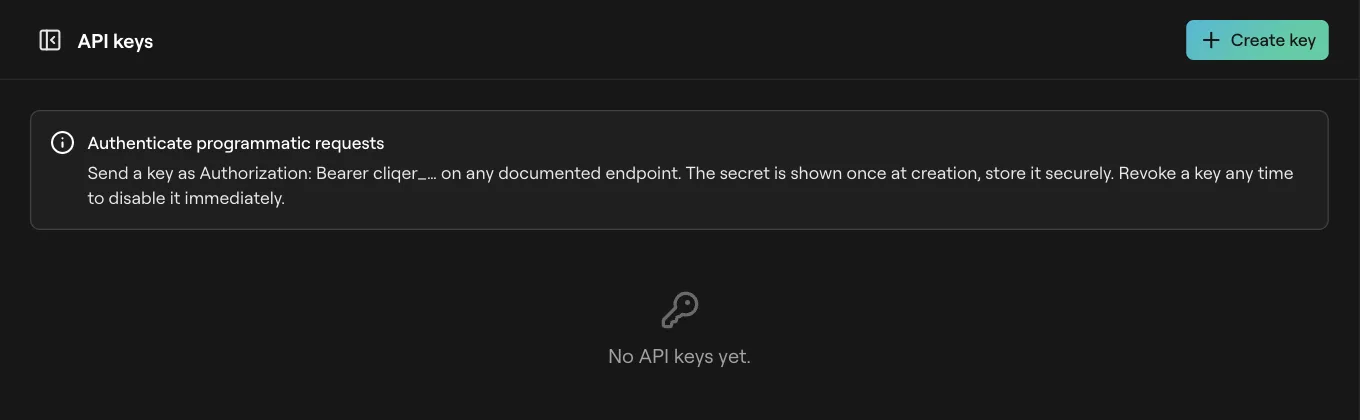
Open API keys and click Create key. Copy it now: it is shown once. See Team and API keys.
Find the room id
It is the part after /timer/r/ in the control room address, for example https://cliqer.io/timer/r/<room>/control.
Make a call
Send the key with each request. ping checks the room is there.
The API runs the same room as the control room: a call from your tool shows on every screen at once.
Requests
Every call is https://cliqer.io/api/timer/v1/<room>/<action>. GET, POST, PUT and PATCH all work. Parameters go in the query string, or in a JSON body on POST, PUT and PATCH; the body wins when both have one. Dashes in the action name work too, so add-time is add_time. /api/timer/v0/ takes the same calls.
Send the key in one of these, checked in this order:
| Where | Example |
|---|---|
Authorization header | Authorization: Bearer <key> |
x-api-key header | x-api-key: <key> |
api_key query | ?api_key=<key>. Avoid it where you can: addresses end up in logs. |
curl -X POST https://cliqer.io/api/timer/v1/<room>/add_time \
  -H "Authorization: Bearer $CLIQER_KEY" \
  -H "content-type: application/json" \
  -d '{"timer_id": "<timer>", "amount": "2m"}'
const res = await fetch('https://cliqer.io/api/timer/v1/<room>/add_time', {
  method: 'POST',
  headers: { 'authorization': `Bearer ${process.env.CLIQER_KEY}`, 'content-type': 'application/json' },
  body: JSON.stringify({ timer_id: '<timer>', amount: '2m' }),
})
const { ok, message, data } = await res.json()
import os, requests

r = requests.post(
    "https://cliqer.io/api/timer/v1/<room>/add_time",
    headers={"Authorization": f"Bearer {os.environ['CLIQER_KEY']}"},
    json={"timer_id": "<timer>", "amount": "2m"},
)
print(r.json())
Keys and permissions
Your account API key can do everything on rooms you own. A room can also hold its own keys, each with some of three permissions:
| Permission | Allows |
|---|---|
| Read | The get_ actions and export. |
| Show call | Transport, time, blackout, on air and messages. |
| Edit | Deleting, importing, raw intents and the webhook. |
A call that needs a permission the key lacks gets 401. A room key's secret is shown once, when it is made. Using the API at all needs the API in your plan, see Plans and limits.
Actions
timer_id picks a timer by its id; index picks it by position, counting from 1. When both are sent, timer_id wins. Leave both out to act on the current timer.
| Action | Returns |
|---|---|
get_room | Title, date, time zone and settings. |
get_status | What is running now. |
get_timers | The rundown. |
get_messages | The messages. |
get_questions | Audience questions. |
get_connections | Connected devices. |
get_logs | The room log. limit, offset. |
export | The whole room as a cliqer-timer-<room>.json download. |
| Action | Parameters | Does |
|---|---|---|
start, start_or_stop | timer_id or index | Starts, or toggles. |
stop | Stops the running timer. | |
start_fresh | timer_id or index | Starts from the full length. |
select | timer_id or index (one is needed) | Makes it current without starting. |
reset | timer_id or index, autostart, from_memory | Back to the full length. |
next, previous | autostart, from_memory | Moves through the rundown. |
add_time, subtract_time | timer_id, amount | Changes a timer's length. |
jump | amount | Jumps the running timer by that much. |
set_remaining | amount | Sets the time left. |
flash | count, message | Flashes the screens. |
stop_flash | Stops flashing. | |
blackout | on | Blackout on or off. |
blackout_on, blackout_off, toggle_blackout | The same, without a parameter. | |
focus | on | Focus the message. |
on_air | on | The On air sign. |
show_message | message_id, focus | Shows a message. |
toggle_message | message_id | Shows it, or hides it if showing. |
hide_message | Hides the message. |
| Action | Parameters | Does |
|---|---|---|
delete_timer | timer_id | Deletes a timer. |
delete_message | message_id | Deletes a message. |
delete_question | question_id | Deletes a question. |
import_csv | csv, replace, date_line, columns, header_row, rows | Imports rows, as in Import from Stagetimer. |
intent | {"intent": {...}} | Any change the control room can make, as JSON. |
webhook | url | Sets or clears the webhook. See below. |
| Action | Parameters | Does |
|---|---|---|
ping | Answers pong if the room exists. | |
submit_question | text (up to 1000 characters), name (up to 100) | Sends an audience question. |
vote_question | question_id | Votes on one. |
Amounts are 30s, 5m, 1h, 250ms, or a bare number of seconds. seconds works in place of amount, and a minus sign goes backwards. Switches like on, autostart and replace read 0, false, off and no as off and anything else as on. Leave on out of blackout to toggle it.
Responses
Every answer is JSON: {"ok": true, "message": "<action>", "data": ...} on success, {"ok": false, "message": "...", "code": "..."} on failure.
| Status | Message | Why |
|---|---|---|
| 400 | Either timer_id OR index are required | select without a timer. |
| 400 | amount is required, like 30s, 5m or 1h | Missing or unreadable amount. |
| 400 | Refused: invalid | The room could not apply it. |
| 401 | Access Denied: Valid API key required | No key, a wrong key or a missing permission. |
| 403 | The API is not in this plan | The room's plan has no API. |
| 403 | Refused: forbidden, Refused: readOnly, Refused: limitReached | Not allowed, a read-only room, or a plan limit. |
| 404 | Room not found, Unknown action <name>, Timer not found | Check the room id, the action or the timer id. |
| 409 | Refused: staleEpoch | The room moved on under the call. Send it again. |
| 429 | Too many requests. Please try again later. | Rate limit. |
| 503 | Refused: authorityOffline | The room's offline desktop host is not reachable. |
Rate limit: 100 calls a minute per key; calls without a key count per address. Each answer carries RateLimit-Limit, RateLimit-Remaining and RateLimit-Reset (seconds until the minute starts again).
Webhooks
Set the address
Call webhook with an https url. The answer holds a secret starting whsec_. Store it: it is shown once.
Receive events
Cliqer Timer sends a POST to that address when something happens in the room.
Check the signature
Verify every request before you trust it.
Clear it
Call webhook without a url. The address and its secret are both deleted.
| Event | When |
|---|---|
timerStarted | A timer starts. |
timerEnded | A timer reaches zero. |
wrapUpYellow | A timer reaches its yellow wrap-up point. |
wrapUpRed | A timer reaches its red wrap-up point. |
messageShown | A message is shown. |
The body is {"event", "roomId", "timestamp", "payload"}. The x-cliqer-timestamp header holds the Unix time in seconds, and x-cliqer-signature holds sha256= and the hex HMAC-SHA256 of <timestamp>.<body> keyed with your secret.
# Recompute the signature of a saved body.
printf '%s.%s' "$TIMESTAMP" "$(cat body.json)" \
  | openssl dgst -sha256 -hmac "$WHSEC" -hex
import { createHmac, timingSafeEqual } from 'node:crypto'

export function verify(rawBody: string, timestamp: string, signature: string, secret: string) {
  const want = `sha256=${createHmac('sha256', secret).update(`${timestamp}.${rawBody}`).digest('hex')}`
  const fresh = Math.abs(Date.now() / 1000 - Number(timestamp)) < 300
  return fresh && want.length === signature.length && timingSafeEqual(Buffer.from(want), Buffer.from(signature))
}
import hashlib, hmac, time

def verify(raw_body: bytes, timestamp: str, signature: str, secret: str) -> bool:
    mac = hmac.new(secret.encode(), timestamp.encode() + b"." + raw_body, hashlib.sha256)
    fresh = abs(time.time() - int(timestamp)) < 300
    return fresh and hmac.compare_digest("sha256=" + mac.hexdigest(), signature)
Sign the raw body exactly as it arrived, before any JSON parsing. The five minute window is your choice; it stops an old request being replayed.
Delivery is one try with a 5 second timeout. Redirects are not followed, and an address that resolves to a private network is dropped. If a missed event matters, read get_status to catch up.
Short links
GET https://cliqer.io/api/timer/link/<code> turns a short link code into its room: {"ok": true, "data": {"roomId", "link"}}, or 404 Link not found for an unknown, revoked or expired code or a wrong password. For a link with a password, send it in the x-link-password header, never in the address.
Companion and Stream Deck
There is no Companion module or Stream Deck plugin for Cliqer Timer rooms yet. Bitfocus Companion's Generic HTTP module can call the actions above. The Cliqer desktop app's own timer has its REST API and Stream Deck support, see Timer (desktop) and Host timer.
FAQ
The key is missing, mistyped, or not yours: an account key works only on rooms you own. Check the header is Authorization: Bearer <key> with no extra spaces.
The room owner's plan has no Timer API. See Plans and limits.
No. The demo room runs only in your browser, so the server has nothing to call.
Check the address is https and reachable from the internet, and answers within 5 seconds without a redirect. Set it again if you lost the secret; the old one stops working.