Privacy and Security
This page describes what the app does. The legal text is the Privacy Policy, which has a section for the Cliqer Remote app; if the two ever differ, the policy rules.
No account in the app
You do not sign in to Cliqer Remote. To join a room you give a room code and, if you like, a name. The app has no in-app purchases and does not use advertising identifiers.
What the app keeps on the phone
- A random device tag and a short-lived presenter key, so the app can reconnect to the room after a dropped connection.
- Your last room, your name, your display preferences, whether you accepted the chat terms, and the rooms whose host messages you blocked.
- If you paired the phone or tablet with a computer, the pairing and a device key (below).
You can remove all of it by clearing the app data or uninstalling the app. Clear room code on the Join screen forgets the last room. See also Account deletion.
Permissions
| Permission | When the app asks | What for |
|---|---|---|
| Camera | When you open the QR scanner, and when you join a call the host invited you to | Scanning a QR code, and your video in the call |
| Microphone | When you join a call | Your voice in the call |
| Face ID, Touch ID, fingerprint or screen lock | When you pair with a computer, and when the app connects to it | Proving the device is the one that was paired |
The app does not ask for your location, your contacts or notifications.
Watch apps
The Apple Watch and Wear OS apps work linked to your phone or on their own, and ask for no permission of their own.
- Linked to your phone, a watch does not connect to Cliqer. The phone passes the slide number and the timer to the watch, and the watch passes your taps back, over the link between your own phone and watch.
- On its own, when you join a room on the watch, the watch connects to Cliqer as a presenter, like the phone app. It sends the room code you enter, the watch's name as your presenter name and a random presenter key it creates so it can reconnect. It takes a presenter place in the room, and Cliqer keeps the same connection record as for the phone app. The watch keeps the last room code and that key on the watch.
A watch has no account and no sign-in. See Watch apps.
Chat
Messages you send in a room go to the room host. The app keeps up to the last 200 messages in memory for the session and Cliqer does not keep the room chat after the session ends. A message you report is sent to Cliqer for review, with the room code and the reason you give. See Presenter tools.
How pairing with a computer is protected
- The device holds a device key. Pairing creates a key in the secure key storage of the phone or tablet. The private part never leaves it, and using it needs Face ID, Touch ID, your fingerprint or your screen lock. Cliqer only ever sees the public part.
- Pairing is to that computer. Each installation of Cliqer on a computer makes a secret of its own. The computer keeps it, and Cliqer keeps only a one-way hash of it, so a device paired with one computer cannot see or reach any other. There is no account to take over.
- The QR code is the key to pairing. It lives for 60 seconds, works once, and a second use of the same code cancels the pairing. Wrong codes from one network are slowed down and blocked. Treat the QR code like a door key and do not show it to people you do not want to pair.
- You are told, and you can remove it. The computer shows a notice for every pairing and lists every paired device with a Remove button. See Control the host.
- It ends with Cliqer. Control works while Cliqer is open on the computer.
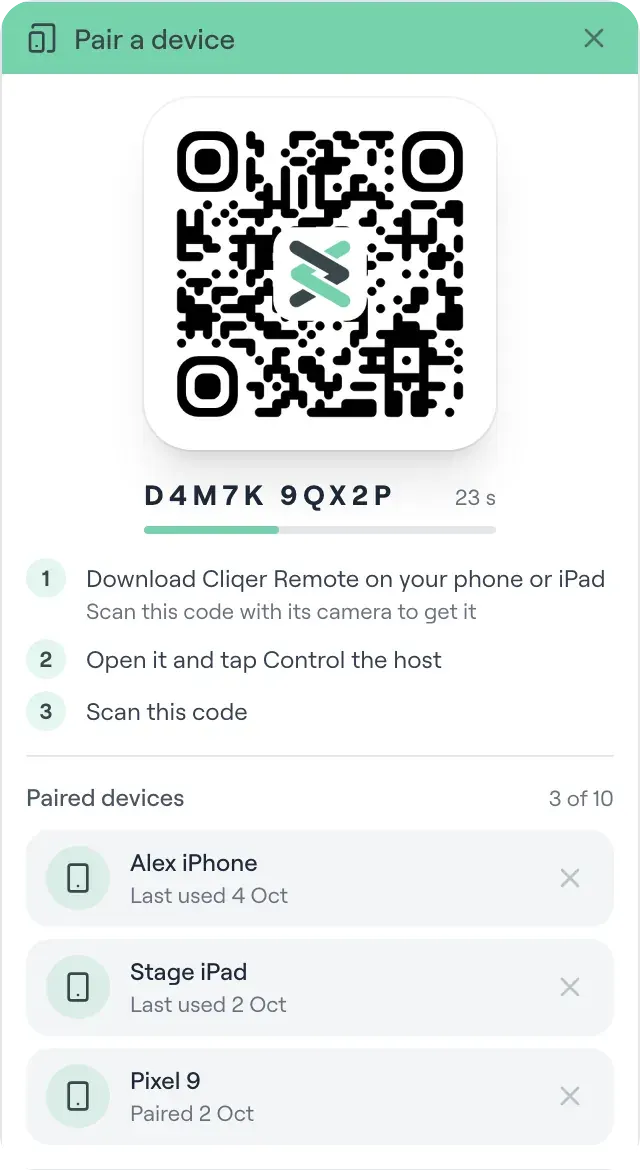
The QR code in the Pair a device window lasts 60 seconds and works once, and every paired device is listed with an x to remove it.
Calls and the shared screen travel encrypted, directly between the phone and the host whenever the network allows it, and through an encrypted relay when it does not. See Security and Networking.
Watch Apps
Move slides from your wrist with the Cliqer Remote apps for Apple Watch and Wear OS. Next and Back, the slide number and the timer, linked to your phone or on their own with a room code.
Troubleshooting
Fixes for the problems people hit most with the Cliqer Remote app, joining a room, missing controls, calls and pairing with a computer.