Solution blueprint
Cliqer lets a presenter control a presentation running on another computer, in the same room or remotely, with slide control, laser pointer, timers and optional camera / screen streams between participants. This page is the architecture overview for IT, security and procurement teams evaluating Cliqer. The companion Data flow diagram covers what data moves where.
Deployment model
Cliqer is delivered as SaaS plus a desktop application. There is nothing to host, no inbound firewall rules and no server component installed in your environment.
| Component | Runs | Purpose |
|---|---|---|
| Desktop app (macOS, Windows) | On the presentation host machine | Drives the presentation software, hosts the session |
| Web app | Any modern browser | Presenter remote, viewers, callers, team dashboard and admin |
| Cliqer platform | Cliqer-operated dedicated infrastructure, behind a global anycast edge network | Web application, account platform, realtime room coordination |
| STUN / TURN | Global relay network | NAT traversal and encrypted relay fallback for WebRTC |
| Payments | Processor-hosted pages (PCI DSS Level 1) | Checkout and billing portal; card data never touches Cliqer |
Architecture
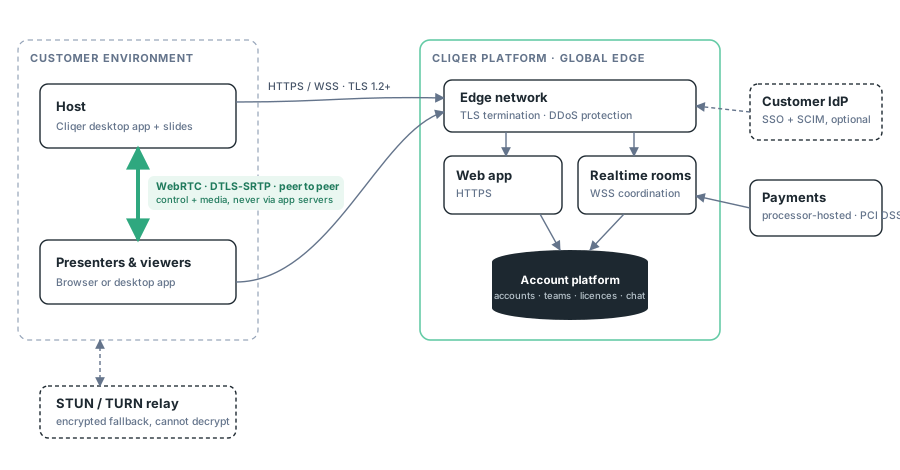
- Sessions are peer to peer. The platform coordinates who is in a room; slide commands, pointer and media streams travel directly between participant devices over encrypted WebRTC, with an encrypted TURN relay as fallback on restrictive networks. Presentation content is never uploaded to Cliqer.
- The platform is stateless towards your content. It stores accounts, teams, licences and support conversations - not presentations, not session media, not in-session chat (text-only, peer to peer).
- Everything is TLS. HTTPS and WSS only, on port 443, plus the published STUN/TURN ports. Full port table: Security & Networking.
Identity and access
| Capability | Detail |
|---|---|
| Sign-in | Email + password, passkeys (WebAuthn) |
| SSO (Enterprise) | OpenID Connect against your IdP, with an enforceable "Require SSO" mode. SSO FAQ |
| Provisioning (Enterprise) | SCIM 2.0 - create, update and deactivate members from your IdP. SCIM FAQ |
| Authorisation | Built-in owner / admin / member roles plus custom roles with granular permissions. Team roles |
| Session access | Sessions are joined by invite; the host sees every participant and can remove and block them |
All enterprise security features are self-service from Dashboard → Team → Security; see the Security overview.
Tenancy and isolation
- Multi-tenant SaaS with logical isolation: every record is scoped to an account or team, enforced in the application layer on every request.
- Sessions are isolated per room; the host sees every participant live and can remove and block any of them.
- Team data is administered only by your own team members with the relevant role permissions; there is no Cliqer-side console your data is managed from.
Client software integrity
- macOS builds are Developer ID signed and notarized by Apple.
- Windows builds are Authenticode signed.
- Updates are delivered as signed packages over HTTPS with in-app update prompts; no silent third-party update channels.
Network requirements
Outbound HTTPS/WSS on 443 to the Cliqer platform, plus outbound STUN/TURN as listed in Security & Networking. Fully locked-down networks that allow only TCP 443 are supported via TURN over TLS on 443. No inbound ports, no port forwarding, no VPN.
Review support
For vendor onboarding questionnaires, data processing terms, the named subprocessor list (under NDA) or a walkthrough with your security team, contact us - include your requirements list and we will respond point by point.