


Live Production
Cliqer vs Ecamm Live: which live studio fits your show?
Cliqer vs Ecamm Live compared fairly: Mac and Windows, Studio, Live, Timer and phone remotes against a Mac-only studio.
vMix is the production suite that a generation of Windows operators learned on, and it has earned that place. If your crew lives in it, runs it on a dedicated PC and owns a licence for life, there is no reason to read a vendor's opinion of it. The question this post answers is narrower: what changes if you put Cliqer Studio, the live production window of the Cliqer desktop app, next to it?
We make Cliqer, so this is a head-to-head written to be fair. vMix's prices and edition limits come from its own pages, read in October 2026. Cliqer's come from our docs and our comparison data. Where vMix is ahead, we say so. If you only need to move slides inside a vMix show, our post on controlling presentations inside a vMix production covers that job on its own.
Start with credit, because it is owed. vMix is a Windows production suite with years of use behind it. Its own purchase page lists five editions, from Basic HD to 4K, Pro and a monthly MAX subscription. It takes up to 1,000 inputs on every edition above Basic HD, and its feature pages describe vMix Call for browser guests, instant replay for up to eight cameras, NDI, SRT and a built-in title designer with more than 100 animated titles.
It also has a pricing model many operators love. You buy an edition once, keep it for ever, and get twelve months of updates with it. If you run the same rig every week for years, that is hard to beat, and nothing in this post is meant to talk you out of it.
Two more advantages are not features at all. A mature product has answered most of the odd questions already: a crew can find a forum thread, a freelancer who knows the keyboard shortcuts and a spare PC to put it on. And its edition ladder starts very low, with Basic HD at a lifetime price that is a fraction of a Studio plan, albeit with four total inputs and 1080p.
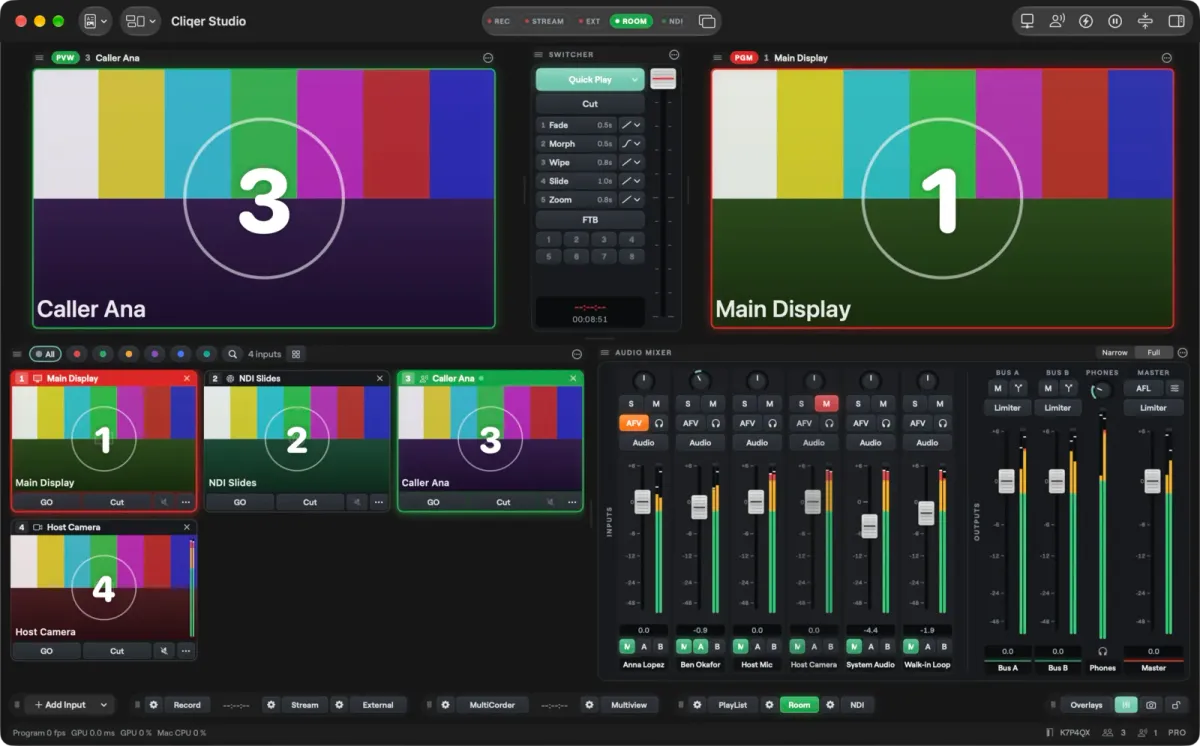
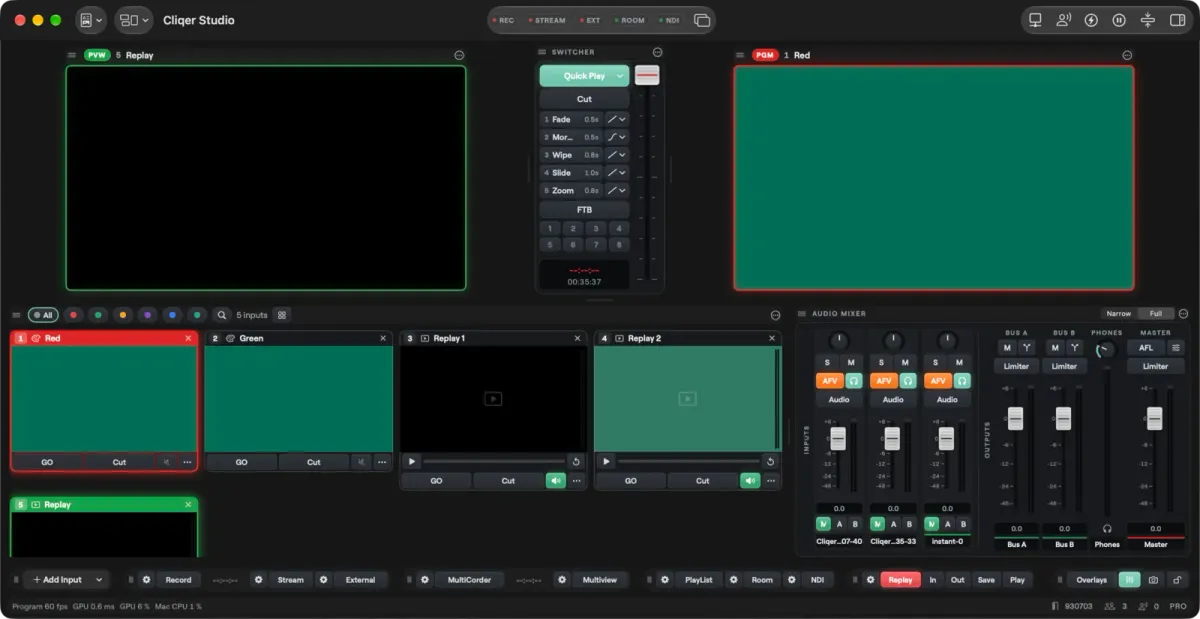
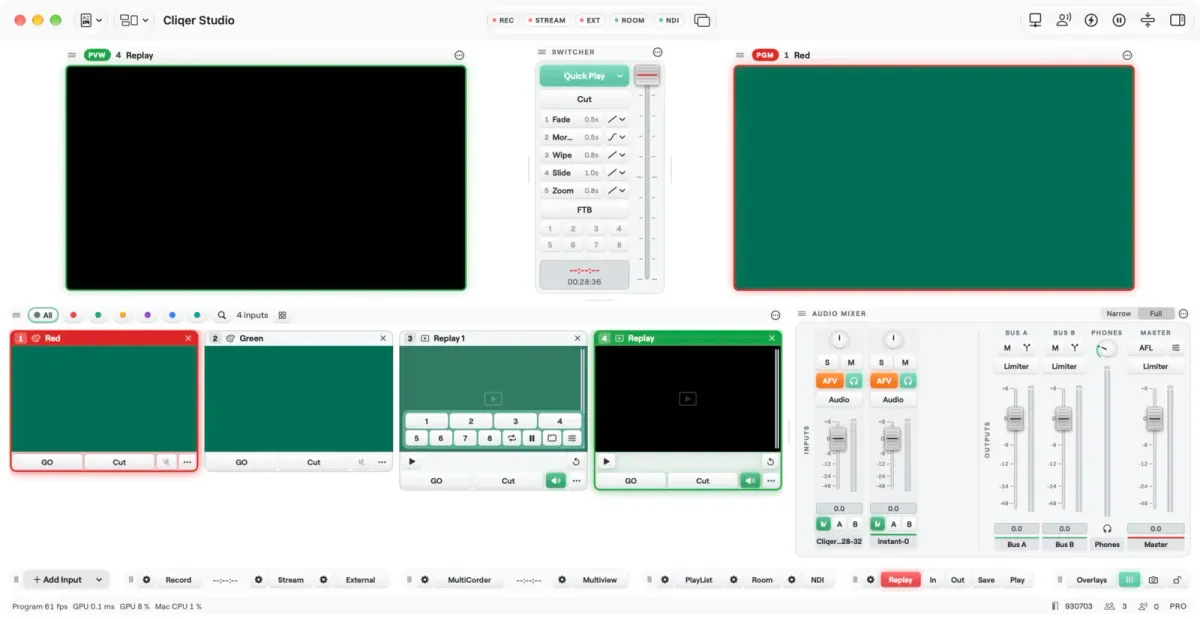
Studio is a live switcher built into the Cliqer desktop app on Mac and Windows. You add inputs, put one on Preview, take it to Program and send Program to the room, NDI, a recording, a stream or a virtual camera. If you have used any switcher, the window will read at once: Preview, Switcher and Program across the top, the Library, the inputs and the Audio Mixer in the middle, and a bottom bar of outputs.
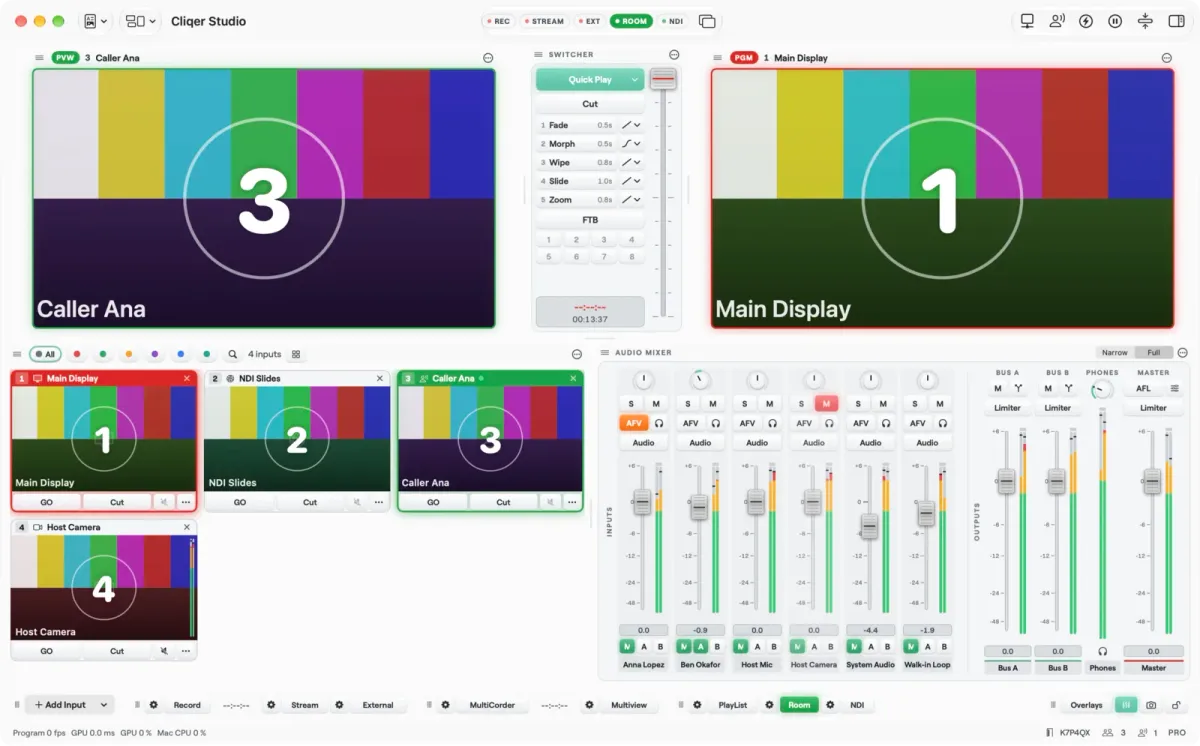
The Studio window on macOS. The Windows app has the same Studio features.
Two things make it different from a classic switcher. First, it sits inside the same app that runs your presentation room, so slides, speaker timer, presenter list and production are one tool, not four. Second, it is native on both platforms: the engine is written in Rust and draws with Metal on the Mac and Direct3D on Windows. On a Mac, camera frames, sources and Program stay in GPU memory and the hardware encoder reads Program straight from the GPU surface; on Windows, camera decoding and colour conversion run on the GPU. Our post on why Cliqer 3 is native explains the reasoning, and the full Studio overview walks through every panel.
Studio needs a signed-in host, macOS 15 or later, or Windows 11. A phone or browser can join a room, but the computer runs Cliqer: a browser cannot host.
The biggest practical difference is the computer you need. vMix's system requirements list Windows 10 and Windows 11, and its pages do not mention macOS. That is a perfectly good position when your production desk is a PC. It is a hard stop when your venue, your church or your content team lives on Mac.
Cliqer Studio runs natively on both, with the same plans on each. If a team has a mix of laptops, the show file and the skills travel with the person.
$60
vMix Basic HD, lifetime licence (1080p, four inputs)
$350
vMix HD, lifetime licence (1080p)
$700
vMix 4K, lifetime licence
$1,200
vMix Pro, lifetime licence. MAX is $50 a month
vMix prices as listed on its purchase page at the time of writing, October 2026, in US dollars. A lifetime licence includes twelve months of updates.
Cliqer Studio comes as a plan or as a one-time purchase you keep, and the free trial includes every Studio feature. Current prices are on the pricing page. How the two line up:
Be fair about the shape of the money. vMix is a purchase, then updates after a year at an additional cost. Cliqer is plans. Which is cheaper depends on how many years you will run it, how many computers, and how much of the extra (replay angles, virtual sets, captions) you use. Our switching page puts the first year side by side with real figures from the live catalogue; for a five-year view, do your own sums.
Both products take the same families of source: cameras and capture cards, NDI, network streams, media files and playlists, web pages, colours, and slides.
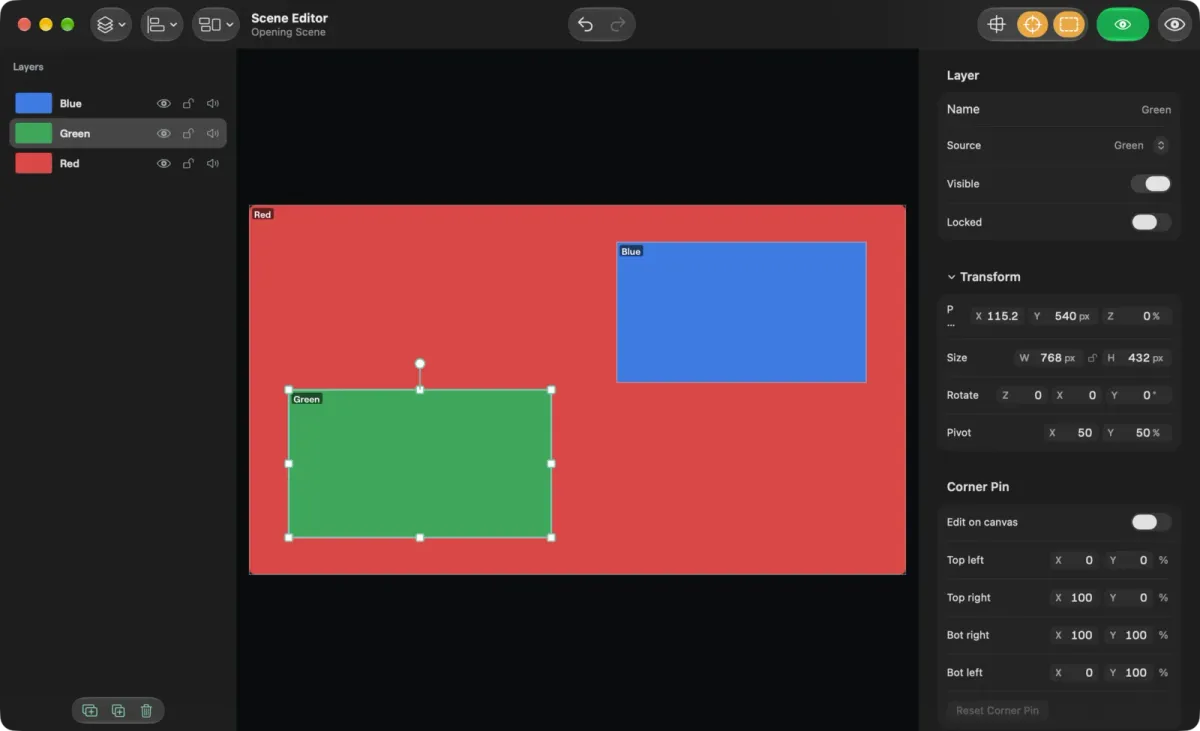
On the Cliqer side, the input list is wider than you might expect from a presentation tool. Studio takes displays, cameras, NDI, Blackmagic cards, Syphon and Spout senders, SRT, RTMP, RTSP and HLS streams, web pages, media lists, 22 built-in animated generators or your own ISF shader, and people on a video call. A scene is an input in its own right, built from layers of other inputs.
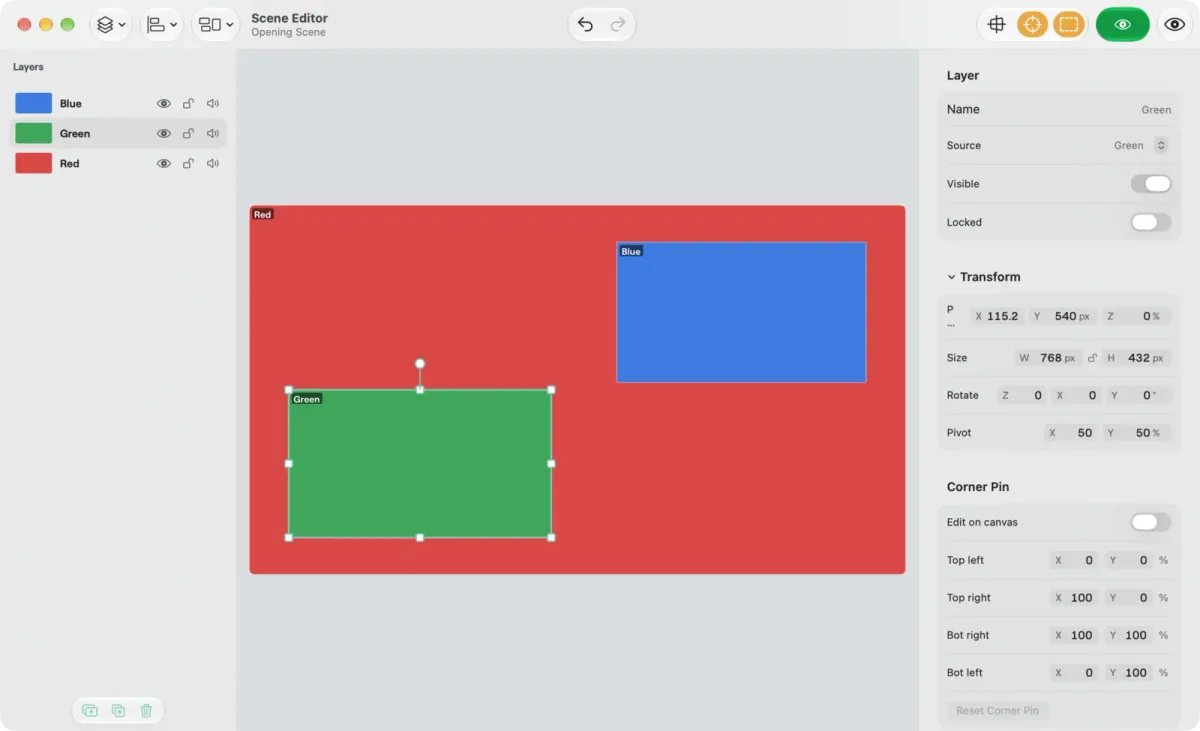
The Scene Editor. Layers stack over any input, so picture in picture and side by side layouts are a few drags.
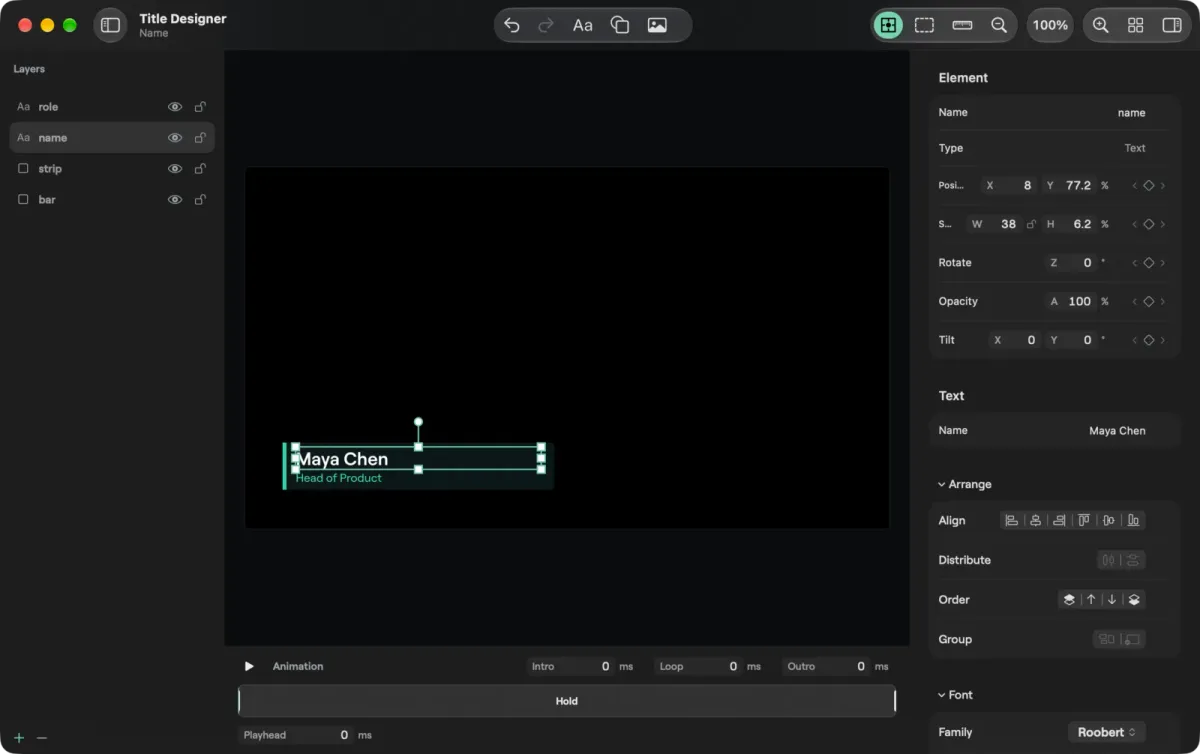
Titles are the clearest place where vMix has more history. Its GT Designer comes with a large library of animated titles. Cliqer's Title Designer is newer, but it covers the daily work: lower thirds, lower thirds filled from a CSV or JSON file, timers and clocks, with text, shapes and images on layers and an animation strip under the canvas.
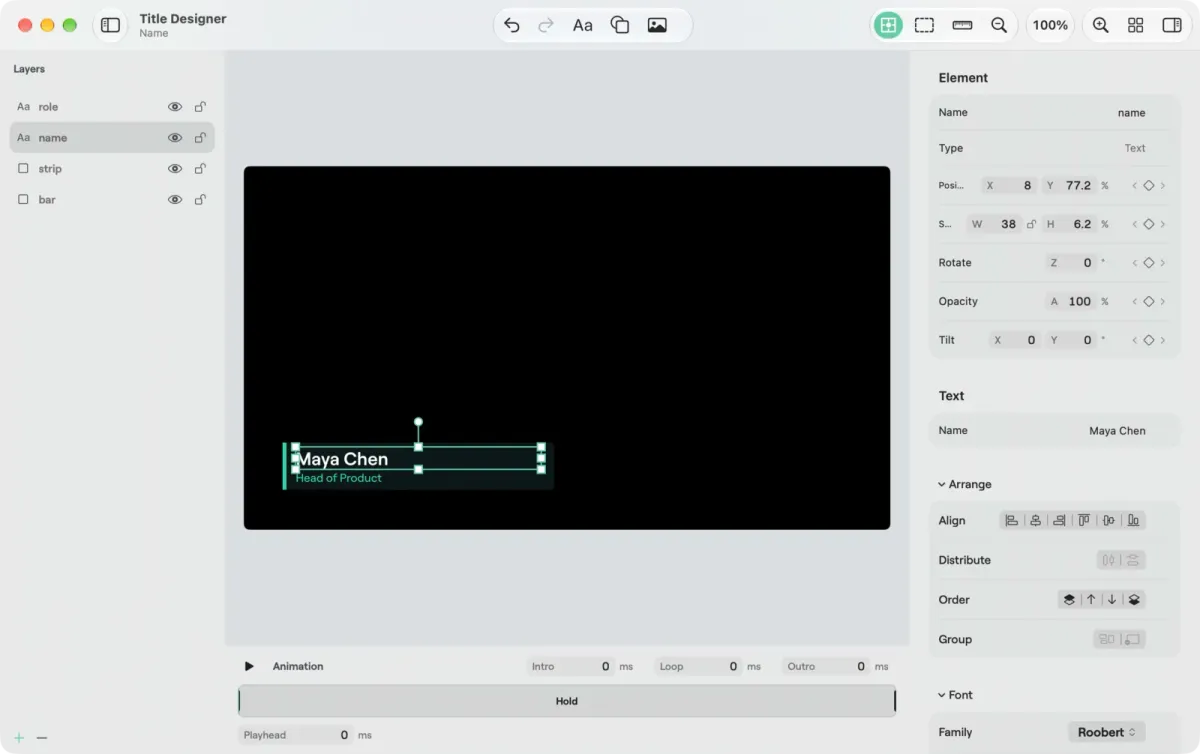
The Title Designer draws the title with the same engine that puts it on air.
If you build a lot of graphics-heavy shows today, look at the title library before anything else. That is where a 100-title head start is worth the most.
On picture quality, Studio's output canvas goes up to 7680 x 4320, the area of sixteen full HD screens from one computer. On Studio 8K and Enterprise, Program can run in 10-bit SDR, HDR PQ or HDR HLG up to 4K, with HDR inputs tone mapped for the outputs; Blackmagic outputs then send 10-bit, NDI sends 16-bit and HEVC carries a real 10-bit picture (Main10). Display outputs use the monitor's native mode, and HAP, HAP Q, HAP Alpha, HAP Q Alpha and HAP R files play back as inputs.
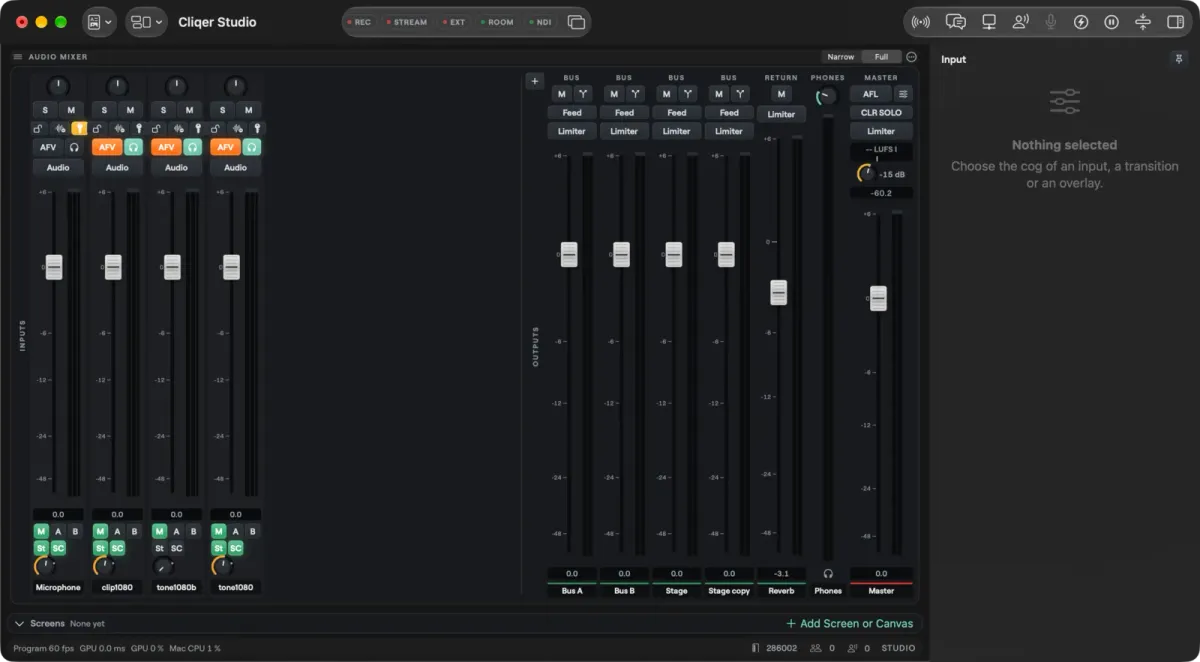
A show is half sound, and Studio's mixer is built for it. It is a full mixer with routing: every input with sound gets a strip, feeding Master, Bus A, Bus B, any Groups and Returns you add, and a Phones mix. Add your own Groups as sub-mix buses and your own Returns for effects and shared sends, then rename, reorder or duplicate them. Sends are pre or post fader, and every bus has its own fader, mute, meter, processing and limiter. The room, each NDI output, each router output and each video call guest's return picks any bus by name, and every edit is one undo step.
The engine mixes in 32-bit floating point. Every strip, bus and plugin runs in float, so nothing clips inside the mix however hot the sends, which gives you effectively unlimited internal headroom. The limiters on Master and every bus, with a ceiling from -24 to 0 dB, cap the output on the way out, and guests on a video call get a mix-minus return that never goes above it.
Each input strip has Cliqer's own processing, written for the real-time audio thread so it never allocates memory, never takes a lock and does not glitch under load: delay up to 1000 ms, a high-pass from 20 to 400 Hz, a gate, a four-band EQ (20 Hz to 20 kHz, -18 to 18 dB, Q from 0.1 to 10) and a compressor with a ratio up to 32. For anything else, input strips take your VST3 plugins on macOS and Windows and Audio Units on macOS as inserts, each with its own editor and its state saved in the show.
Routing goes beyond the mixer. The Router shows every audio input and output in Patch and Matrix views, and Dante Virtual Soundcard, Dante Via, AVB and BlackHole appear as ordinary devices to route. AES67 network audio carries up to 64 channels per endpoint at 24-bit, clocked by PTP, and on Windows Studio runs ASIO at 48 kHz.
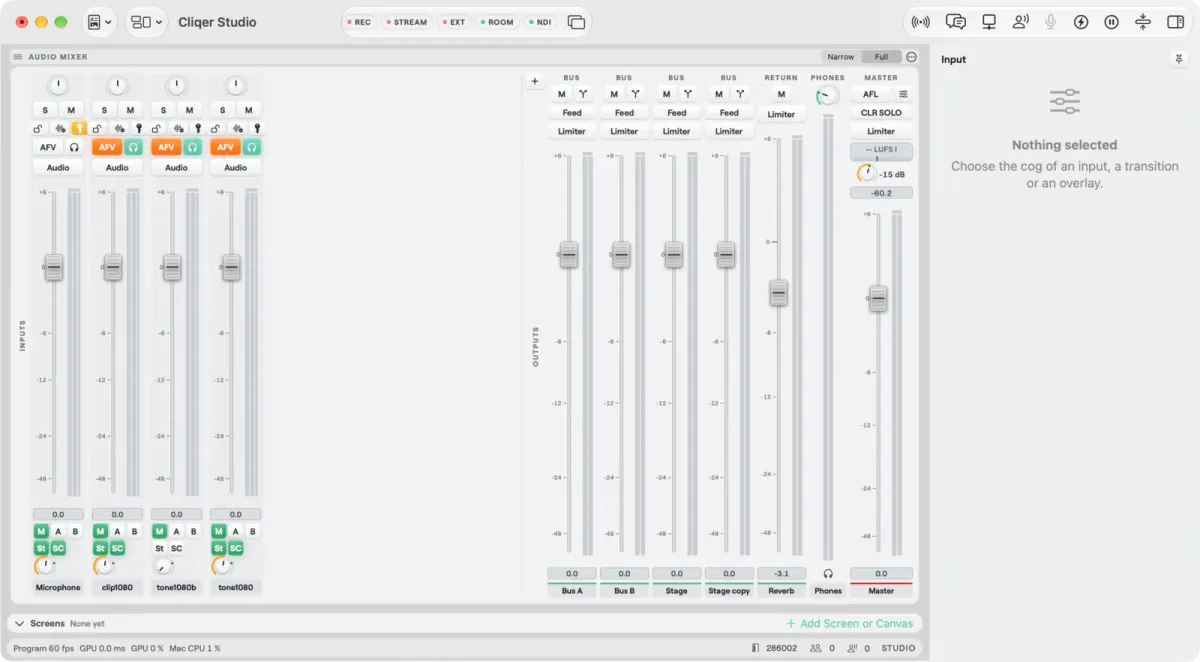
Buses, a group and a return in the Studio mixer.
Buses and processing are a feature of Studio 4K and up, not the entry plan. Check the plans and limits page for the exact line before you buy.
Replay is a good place to be exact, because vMix is strong here. Its replay product handles up to eight cameras with preset durations. Cliqer's replay ring keeps the last seconds of Program on disk; you mark In and Out, save the clip as a media input, or play the last seconds again at 100, 75, 50 or 25 percent speed on Preview or Program. Replay of Program starts at Studio 4K. Multiple angles and Quad need the Replay add-on on Studio 4K and are included in Studio 8K.
For recording, Cliqer writes a normal program file (H.264 by default, with HEVC, ProRes 422 and ProRes 422 HQ on the higher plans, ProRes on a Mac), and MultiCorder records every input you choose to its own file, all started on the same instant so they line up in an editor. vMix offers the same idea as ISO recording, on its 4K and Pro editions.
Remote guests are a place where the two are level. vMix Call brings guests in from a browser, up to eight. In Cliqer a guest joins your room link from a browser and you stage them like any other input, with their own NDI output and a mix-minus return. Studio 8K allows 16 people on a call at once. For the live-caller workflow, see our guide to bringing remote guests on stage.
On the stream side, both can send one Program to several platforms at once. Cliqer streams over RTMP, RTMPS, SRT and WHIP, and a destination is just a name, a server address and a key. Studio's streams are encoded for real time, with no frame reordering (no B-frames), so viewers add no decode delay. Studio 8K allows 5 destinations at once. There is one extra: Cliqer Live is a destination that needs no key, because Studio signs in with your account. It is the delivery path behind Cliqer Live and our live page, with its own picture qualities. Go-live to Twitch and LinkedIn in one click is partial on both products.
Outputs are covered on both sides: NDI, a virtual camera, Blackmagic cards, Syphon and Spout, multiview to a display. If NDI is new to your team, read NDI explained for event teams.
Cliqer started as a way to control presentations from anywhere, and that is still the part vMix does not try to be.
On a Mac, Cliqer cannot drive vMix itself, because vMix does not run there. On Windows it can, which is the setup the vMix post describes.
| Name | Cliqer Studio | vMix |
|---|---|---|
| Runs on Windows | YesWindows 11 | YesWindows 10 and 11 |
| Runs on Mac | YesmacOS 15 or later | NoWindows 10 and 11 only |
| Buy once and keep it | YesOr plans | YesLifetime, or MAX monthly |
| Short pass for one event | YesSeven-day Event Pass | No |
| NDI in and out | Yes | Yes |
| Remote video guests | YesFrom a browser | YesvMix Call, up to 8 |
| Instant replay | YesMulti-angle with the add-on | YesUp to 8 cameras |
| ISO recording | YesMultiCorder | Yes4K and Pro |
| Live captions | Yes | No |
| Hot standby backup | Yes | No |
| Presentation control built in | YesClicker, phone, watch | PartlySlides as an input |
| Native phone and watch remotes | Yes | Not statedNot checked |
| Scripture and lyrics | YesChurch add-on | No |
| Years in the field | PartlyNew in October 2026 | YesMature |
Stay with vMix if your production runs on a Windows PC you control, your crew is trained on it, you want a one-off licence that you keep for years, and you lean heavily on its animated title library or eight-camera replay. It is a proven tool, and a month of rehearsal is worth more than any comparison table.
Choose Cliqer Studio if any of these is true:
Use both if you are mid-move. Cliqer sends NDI that vMix picks up like any other source, and each remote caller can have their own NDI output with their own audio.
If you decide to switch, you do not start from zero. Choose Import vMix Show in the File menu. Video, image, video list, NDI, browser, stream, colour and title inputs come across; anything else arrives as a named placeholder you can swap for the real source. The import is one undo step, and Cliqer will not import while you are live. The switching page has the rest, and the free trial lets you rehearse the whole thing before you commit.
A sensible plan is to rebuild one low-stakes show first, a weekly meeting or a webinar, then run both products side by side through a real event before you retire anything. For crews that already use Companion or a Stream Deck, our posts on Bitfocus Companion and Stream Deck as a show controller show how those panels carry over.
For many shows, yes: it has a switcher, scenes, titles, a mixer, replay, recording, NDI and multi-destination streaming. It is much newer than vMix, so a team that depends on a deep third-party ecosystem or on vMix's title library should test before replacing it.
vMix's own system requirements page lists Windows 10 and Windows 11 and does not mention macOS. Cliqer Studio runs natively on macOS 15 or later and on Windows 11.
At the time of writing, October 2026, vMix lists Basic HD at $60, HD at $350, 4K at $700 and Pro at $1,200 as lifetime licences, plus MAX at $50 a month. Cliqer prices are on the pricing page, and the switching page compares the first year of each side by side.
Yes. Cliqer sends Program and each caller over NDI, which vMix takes like any source, and on Windows Cliqer can step the slides inside a vMix show. The vMix presentation control post has the setup.
Yes, with Import vMix Show in the File menu. Common input types come across and anything else becomes a named placeholder to swap. It cannot run while you are live.
Yes. A replay ring keeps the last seconds of Program, and you can mark clips, save them as inputs or replay at slower speeds. Several angles need the Replay add-on or a top plan, and vMix's replay is the more established of the two.
Download the desktop app, start the free trial and rebuild one show. If you want to see the whole product before deciding, read the Studio overview, the Ecamm Live comparison for Mac-first streamers, or the Barco E2 comparison for large venues.
Cliqer Timer: the stage timer with rundowns, messages and screens for every role
Stage timer for live shows: countdowns, overtime, messages, rundown cues, screens and phone control in Cliqer Timer.
Cliqer vs Barco E2: why we left the hardware processor behind
The Barco E2 blends by hand, lists no warp and adds a frame of delay. How Cliqer Studio runs corporate shows better, by Barco's own figures.
Keep reading


Practical guides for presenters, AV crews and event teams, plus the Cliqer releases that matter. No spam, one click to leave.