Callers
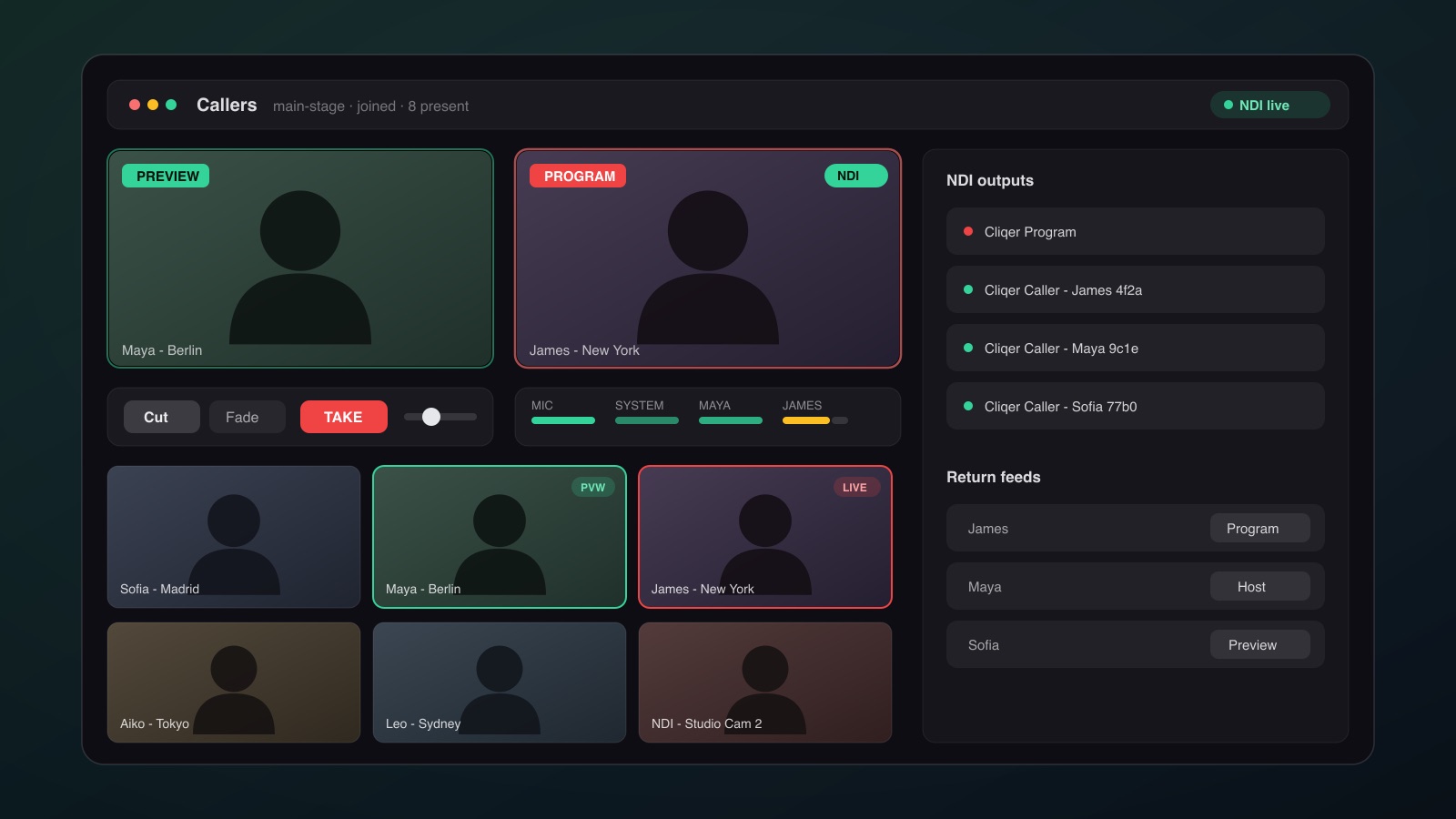
Callers turns Cliqer into a video caller mixer. Remote guests send their camera and microphone into your production; you switch them on a Program/Preview bus like a vision mixer, expose each guest (and the Program output) as an NDI® source for vMix or OBS, and route a return feed back to every caller so they can see and hear the show, without ever hearing an echo of themselves.
Guests need nothing but a browser: they join your room from the normal presenter link on any device.
How It Works
The Callers window is a dedicated mixer window in the desktop app, titled Cliqer Studio (see Studio for the Preview/Program mixer it also provides). It joins your room as a co-host, sees every connected presenter, and owns the caller media, the switcher, the audio engine, and the NDI bridge. Slide control and screen sharing are completely untouched, Callers runs on its own media connections, so cueing slides never competes with caller video.
Inviting Callers
- Open the Callers window in the desktop app while hosting a room.
- Every presenter connected to your room appears in the invite list.
- Click Invite on a presenter. Their browser prompts for camera and microphone, and they appear in the caller grid within seconds.
On the guest's screen a compact caller panel appears in the corner of the presenter view: their return-feed monitor (labelled with what you routed to them), a self-preview, and camera/microphone mute toggles. They can leave the call at any time; you can also kick a caller from their tile.
Capacity
Concurrent callers are capped by your plan:
| Plan | Concurrent callers |
|---|---|
| Free | 1 |
| Pro | 3 |
| Ultra | 9 |
| Studio / Enterprise | 16 |
Guests need any modern browser and no install. The host side needs the Cliqer desktop app.
The Switcher
The top of the window is a two-bus vision mixer:
- Preview (green), the source you have staged next. Click any tile in the grid to stage it.
- Program (red), what is live on the Program output right now.
- TAKE, swaps Preview onto Program using the selected transition: Cut (instant) or Fade (cross-fade, with a T-bar for manual transitions).
Sources on the buses are not limited to callers: external NDI sources on your network (cameras, graphics machines, anything that isn't a Cliqer output) show up in the grid and can be staged and taken exactly like a caller. Their full-quality NDI receiver only runs while the source sits on a bus, so idle sources cost nothing. Cliqer's own outputs are excluded from the grid automatically, so you can never ingest the mixer's output into itself and create a feedback loop.
NDI Outputs
Each caller can be exposed as its own high-bandwidth NDI source, and the switcher's Program bus is a separate NDI source, all with embedded audio:
| NDI source | Content |
|---|---|
Cliqer Program | The switcher Program bus (video + program audio mix) |
Cliqer Caller - <name> <id> | One per caller: their camera + microphone |
Per-caller NDI is toggled on each tile, independent of the switcher, a caller can feed vMix directly as an isolated input while never appearing on your Program bus, or vice versa. This is the same NDI workflow as the timer NDI output, so countdowns, callers, and your Program mix all arrive in your production software the same way. See vMix: Callers as NDI Sources for the vMix side.
Audio: the Native Engine
Caller audio is mixed by a native audio engine inside the desktop app, not in the browser. The mixer window shows a channel strip per source, your microphone, system audio, and one strip per caller, each with a fader, mute, and independent routing to the Program and Monitor buses, with live level meters.
- Program bus, what goes to air: embedded in the
Cliqer ProgramNDI source and in caller return feeds. - Monitor bus, what you hear locally, without affecting the broadcast mix.
- Hardware echo cancellation applies to your own microphone, so an open speaker on the host machine doesn't feed back into the show.
Mix-Minus Return Feeds
Every caller receives a mix-minus return: the full program audio minus their own voice, computed per caller by the engine. Callers hear you and every other caller in real time, but never an echo of themselves, no matter how many callers are live.
Return-Feed Video Routing
You choose what each caller sees, per caller, from their tile:
| Return feed | The caller sees |
|---|---|
| None | Nothing (audio-only return) |
| Program | The live Program bus, the show as broadcast |
| Preview | The Preview bus, useful for cueing a guest before they go live |
| Host | Your own camera |
| Another caller | A specific caller's feed, e.g. two remote guests interviewing each other |
Connection & Security
Caller media uses a dedicated, encrypted WebRTC peer connection per caller, separate from Cliqer's slide-control channel, negotiated over Cliqer's secure WebSocket relay. Connections traverse firewalls using STUN, with automatic TURN relay fallback when a direct path is blocked; media is always end-to-end encrypted (DTLS-SRTP). Network requirements are the same as the rest of Cliqer, see Security & Networking.
Troubleshooting
A caller can't hear the return feed
Browsers block audio that starts without a user gesture (Safari in particular). The caller panel shows a Tap audio button in this case, one tap inside the panel unblocks playback.
A caller sounds like they're echoing
Check their return-feed routing: routing a caller their own feed (via "another caller" pointed back at them) reintroduces their voice. Program returns are always mix-minus and echo-free.
NDI sources don't appear in vMix / OBS
- NDI is produced by the desktop app, which is also what hosts the room.
- Confirm the NDI live indicator in the Callers window header, and the per-caller NDI toggle on the tile.
- Host and production machine must be on the same network segment (see NDI Output).
Video is choppy
Caller video quality is bandwidth-bound on the guest side. Ask the guest to close other video apps or move closer to their router; connections behind restrictive firewalls fall back to TURN relay, which adds a hop.
See also: