


Product News
Why we moved Cliqer's realtime off Cloudflare (and why we're still fans)
Four months on Cloudflare’s edge: what broke, what we built to cope, and why Cliqer now runs on our own dedicated servers.
On 26 September we started building Cliqer Remote, our phone app for presenters, in Flutter. Five days later it was on TestFlight and Google Play's internal track, with every feature of the web presenter: the clicker, the live screen, ink, chat, notes and calls. It worked. Then we measured it on real phones, watched one of them reach a skin temperature of 42 °C just showing a shared screen, and threw it away.
Nobody outside our team ever saw that app. What you get instead is a native app on every platform: SwiftUI on iPhone, iPad and Apple Watch, Kotlin and Jetpack Compose on Android and Wear OS, and one engine underneath, written once in Rust. This is the story of why, with the numbers we measured along the way.
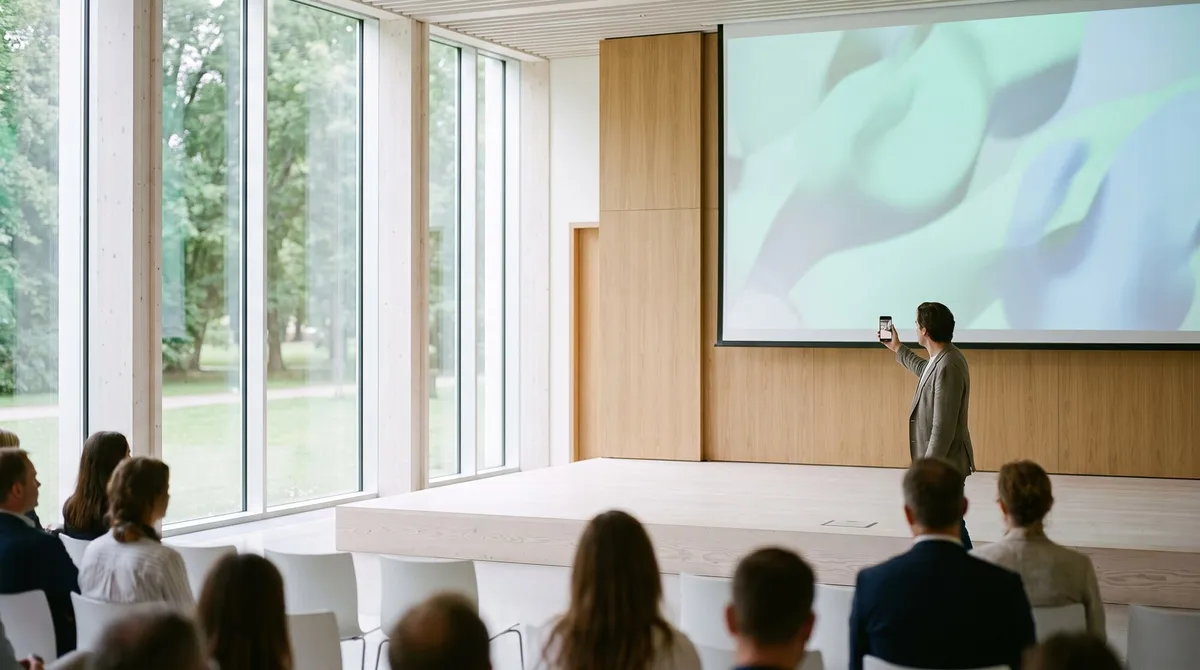
Most apps are used in short bursts. A presentation remote is not. It sits in one hand for a whole talk, often under stage lights, screen on, radio busy the entire time. On Cliqer it also shows a live picture of the presenter's screen, draws ink on the slides, carries chat and notes, and can put the presenter on camera when the host invites them.
That job description sets three rules:
Flutter can do all three for most apps. Ours turned out to be the kind of app where it costs more than it gives.
Credit where it is due. Flutter took us from an empty folder to a full-featured app on both stores in five days, with one codebase, hot reload, a great test story and a UI that looked the same everywhere. We wrote 266 tests for it. If you are building a forms-and-lists app, a dashboard or a store, we would still recommend it without a second thought.
We also learned a lot from it. Nearly every finding in this post came from tracing that Flutter build on a real phone, and some of the fixes now live in every Cliqer client, web included.
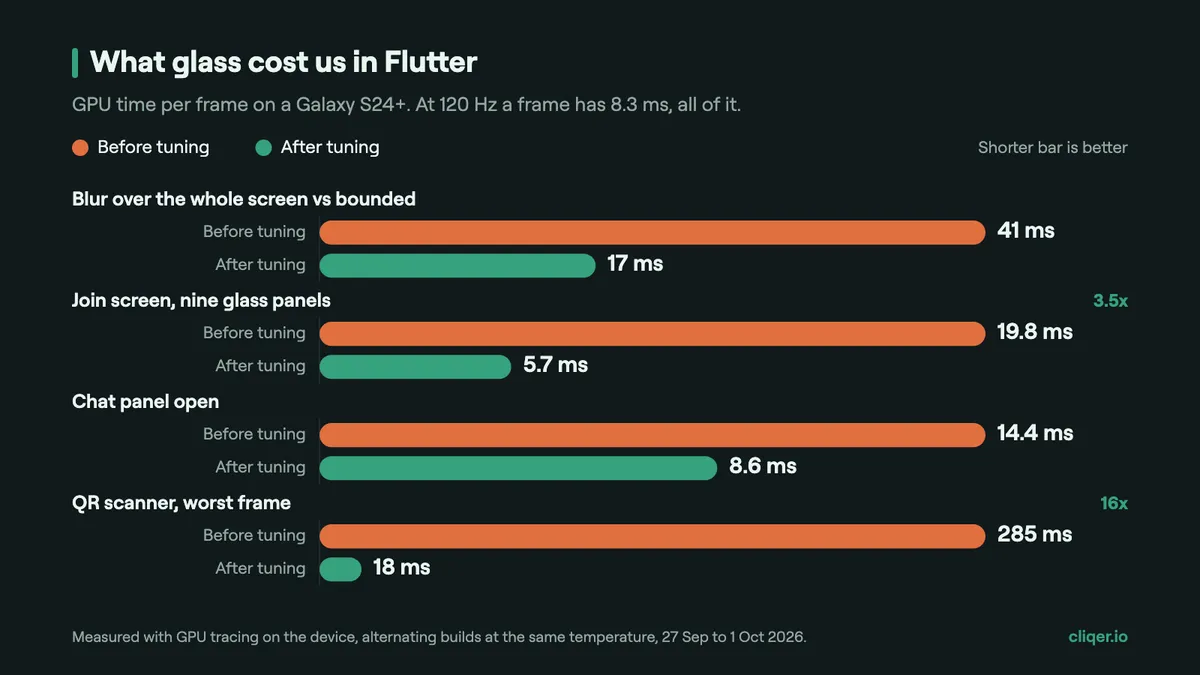
Cliqer's look is frosted glass: translucent panels that blur what sits behind them. On iPhone and iPad this was cheap. On our Android test phone, a Galaxy S24+ with a 120 Hz display, it was not. At 120 Hz a frame has 8.3 ms to be drawn, all of it.
We traced the GPU on the device and found the cause in how the rendering engine reads the backdrop: each glass panel copied the whole screen, every frame, with multisampling on top. The join screen had nine glass panels, so nine full-screen copies per frame. The GPU in that phone is a desktop-class design that is not a tiler: it has no cheap way to read back what it just drew, and every new texture size meant a fresh memory allocation that the kernel zeroes first. In one trace, 71% of the raster thread's time was spent allocating graphics memory.
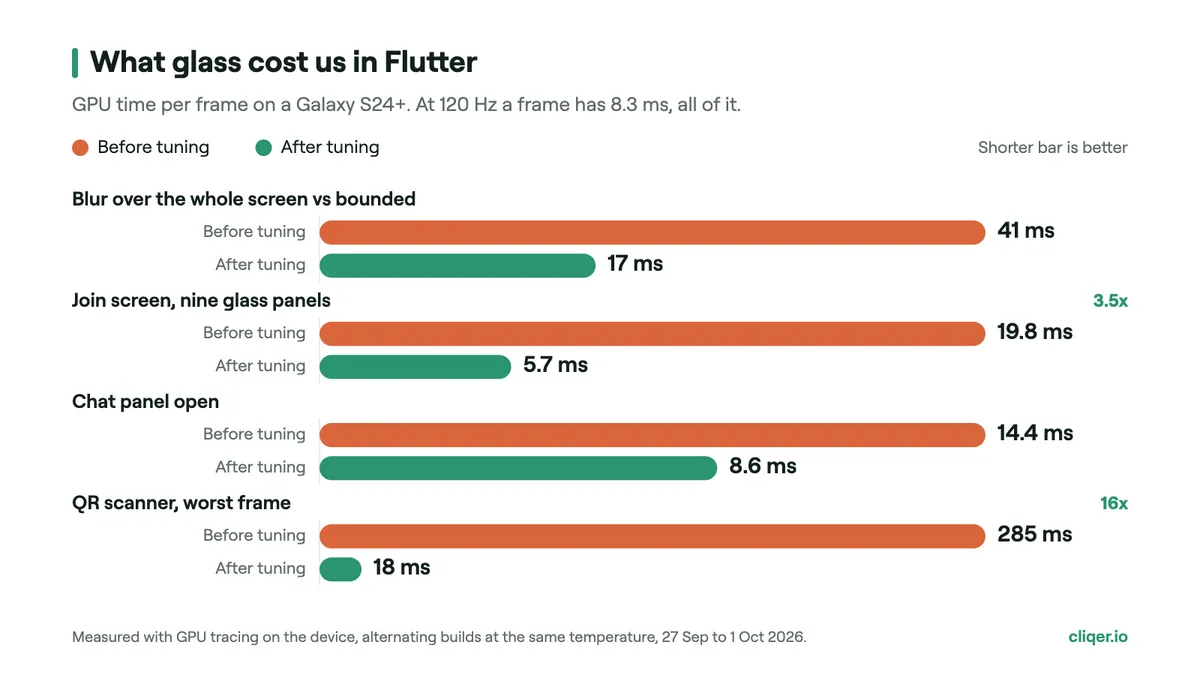
We fixed it, screen by screen. We moved to a pre-release version of the engine so a blur could be bounded to its panel (41 ms down to 17 ms). We grouped the nine panels on the join screen into one shared read (19.8 ms down to 5.7 ms). We stopped animating the size of any glass surface, because every new size was a new allocation, and faked the animations with fixed-size layers instead. The QR scanner's worst frame went from 285 ms to 18 ms.
Every one of those fixes was a workaround for the engine, not a feature for a presenter. And with glass making up 80 to 90% of the GPU time in a room, we were always one new panel away from dropping frames again.
The shared screen is the heaviest thing the app shows. In the Flutter build, each decoded video frame was handed to the UI as a texture, which meant the UI redrew itself for every video frame: the room, the glass, the controls, all of it, 45 times a second, just to move the pixels inside one rectangle.
We first measured that on the Galaxy with system traces on 1 October. While the video played, the GPU sat around 440 MHz. When a slide changed, frames took 25 to 33 ms and the GPU hit its 800 MHz ceiling for more than half of the transition. The phone was at the system's "moderate" thermal status with a skin temperature of 42 °C, and it was capping its own GPU to cope. Heat also made our measurements lie: a warm phone read about 20% slower than a cool one, so every comparison had to alternate builds at the same temperature.
Then we tried the obvious experiment: put the video on a native layer that the operating system composes itself, outside the UI. Same phone, same app, same room: the UI stopped redrawing for video, the GPU clock fell from 440 to 121 MHz, and the frame when a slide changes went from 25 to 33 ms to 3 to 7 ms. We shipped that fix inside the Flutter app on 1 October. It also showed us where the real answer was: in a native app, video always lives on a system layer, on iPhone and on Android, so this whole class of problem disappears by construction rather than by workaround.
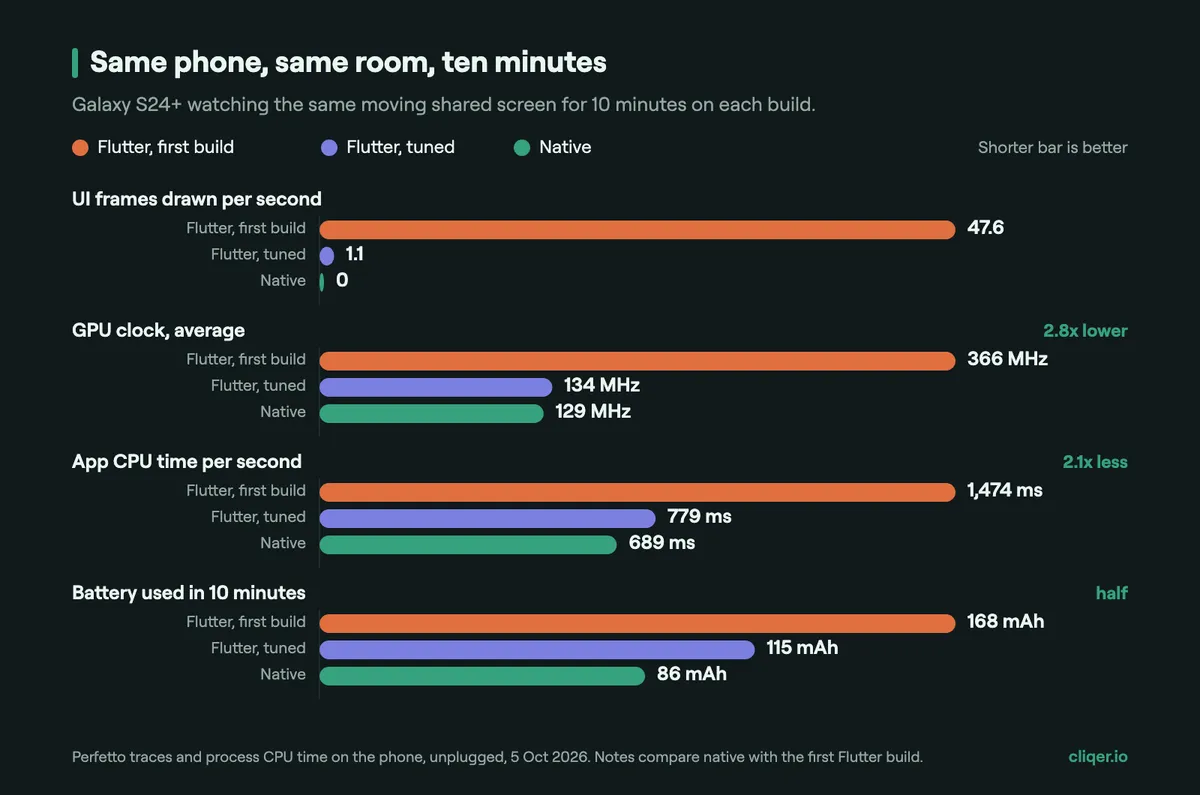
Claims about heat are cheap, so we measured it. On 5 October we put three builds on the same Galaxy S24+, one after the other, each for ten minutes, unplugged, in the same room, watching the same moving shared screen. Before each run the phone cooled back down.
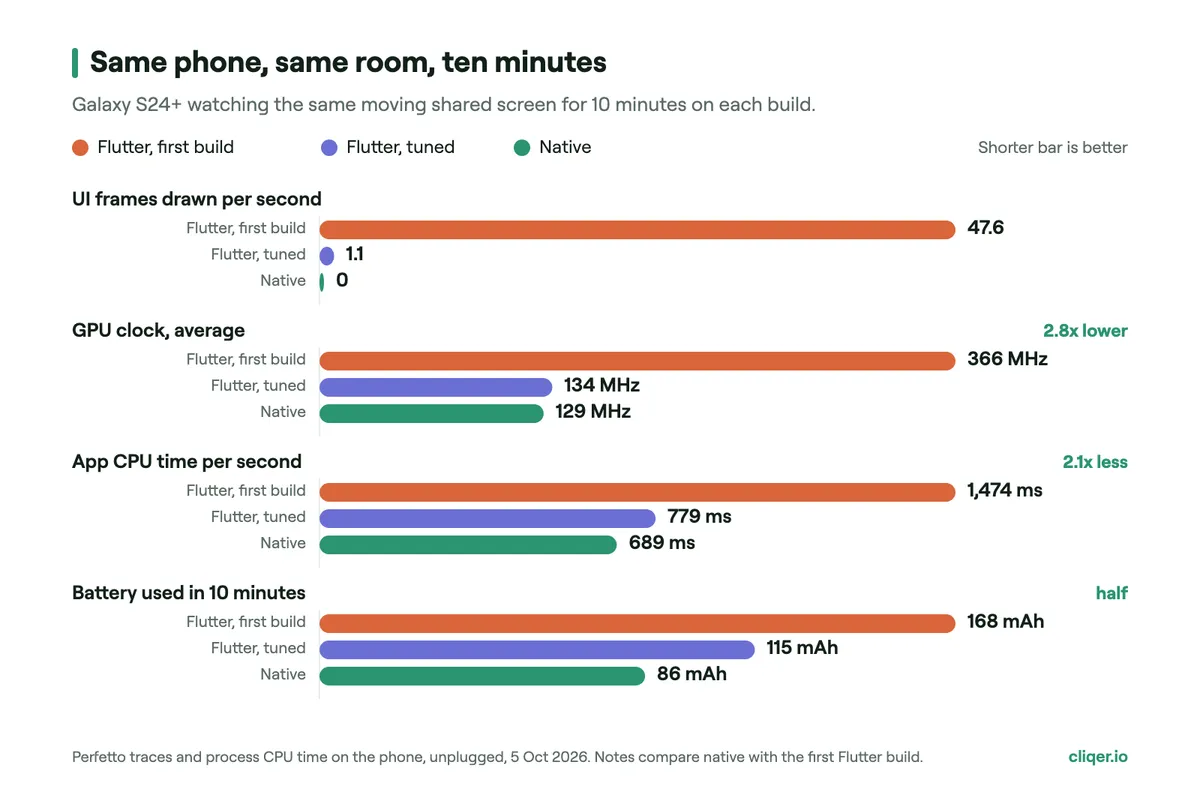
The first Flutter build redrew its whole interface 47.6 times a second just to show a video, kept the GPU at an average of 366 MHz and used 1.47 seconds of CPU time every second. The native app did not draw a single interface frame in ten minutes: only the video layer moved. Its GPU averaged 129 MHz, its CPU 0.69 seconds per second, and it used 86 mAh of battery against 168 mAh. That is half the battery for the same job.
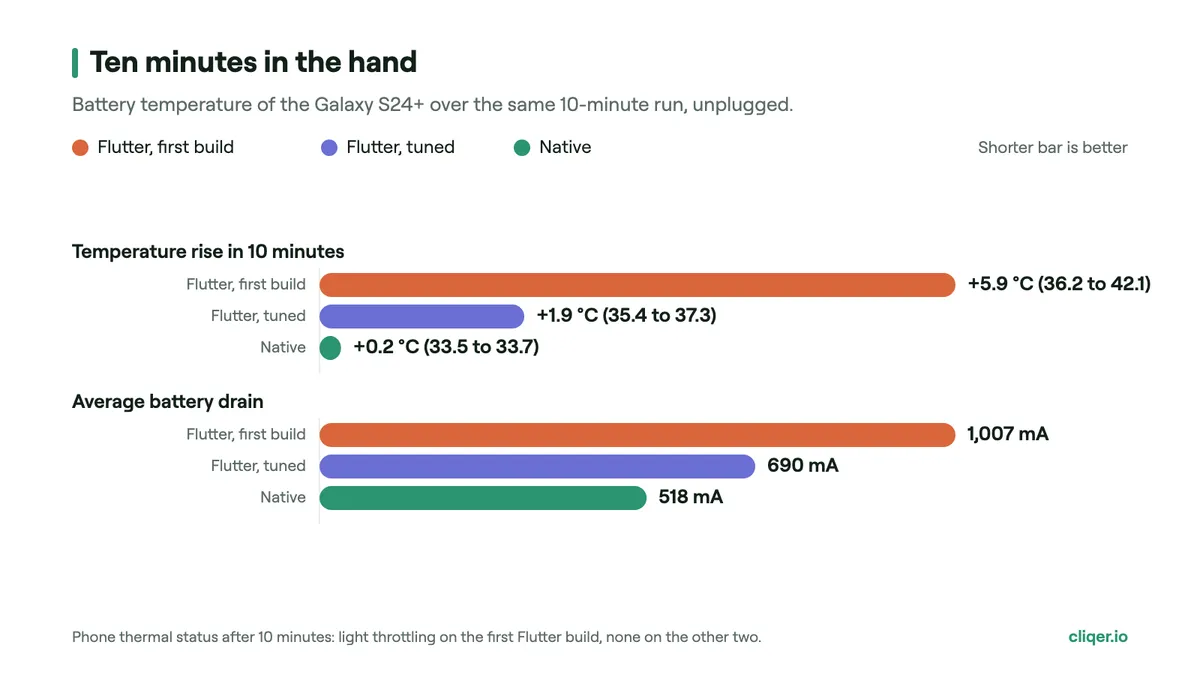
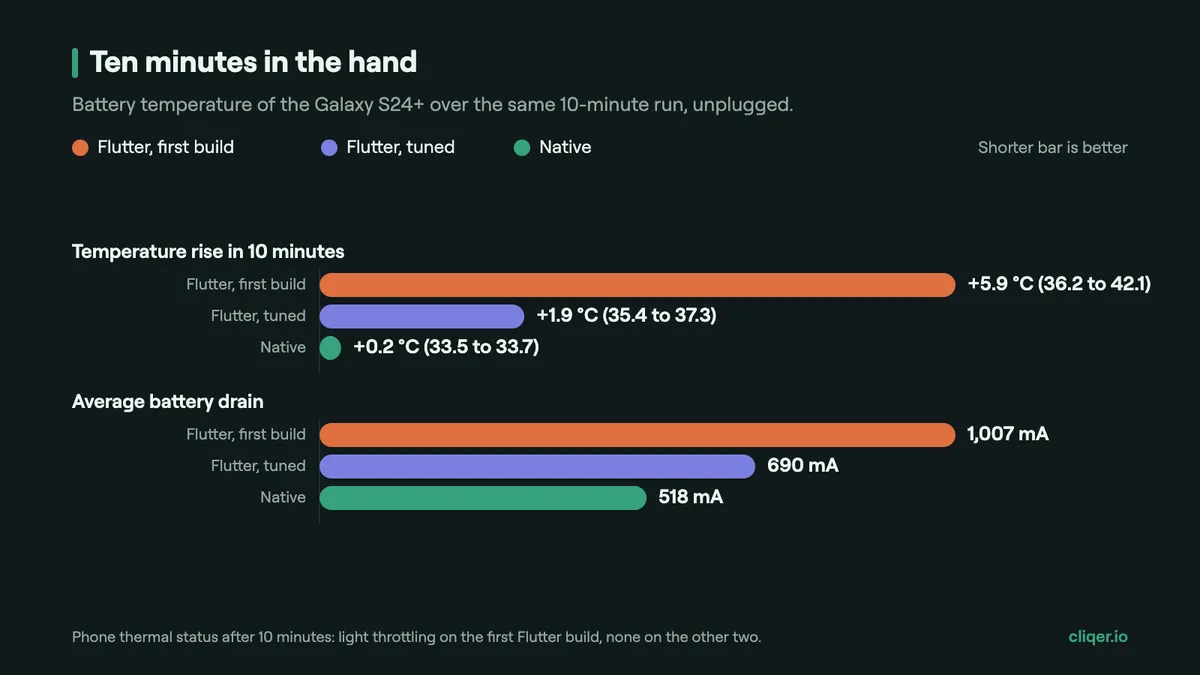
And the heat. In ten minutes the first Flutter build took the battery from 36.2 °C to 42.1 °C, and the phone started throttling itself. The tuned Flutter build rose 1.9 °C. The native app rose 0.2 °C. A talk lasts longer than ten minutes, and that difference is the one you feel in your hand.
To be fair to the tuned Flutter build: it got close. Our own fixes inside Flutter took most of the cost away, and native beat it by a smaller margin, 12% less CPU and 25% less battery. The point is where each one starts. The first build was what a good Flutter app looks like out of the box; native gets the cool result without the workarounds.
How we measured, so you can repeat it: on-device Perfetto traces (frame timeline, GPU frequency, battery counters), process CPU time from the kernel, and the phone's own battery temperature, with the same 60 fps animation on the shared screen for every run. One phone and one run per build, so treat the numbers as a careful field test, not a lab benchmark. The native run also started about 2 °C cooler, which is why we compare the rise.
The new Cliqer Remote is native on every platform, built on one shared engine.
The interface is native on each platform. On iPhone and iPad it is SwiftUI with the system's own Liquid Glass. On Android it is Jetpack Compose, with real backdrop blur where the platform allows it. The Apple Watch and Wear OS apps are native too, small enough to put Next and Back on your wrist.
The engine is written once, in Rust. Joining a room, reconnecting and resuming after a network change, receiving the screen video, sending clicks, laser and ink, chat, notes, the timer, calls and pairing a phone with a computer all live in one Rust library that both apps share. Each app only draws the interface, decodes video with the system's hardware decoder and talks to the camera and microphone. A protocol fix lands once and ships to both platforms, and the two apps cannot drift apart.
Rust was the natural choice for that engine: no garbage collector pausing a frame, memory safety without a runtime, and it compiles to one small library for both iOS and Android. It is quick where it matters. On a Mac, our engine packetises a 20 KB H.264 frame in 31 µs, completes a secure handshake in 198 µs per side, and in our tests hands a 100 KB video frame to the Android interface in 46 µs (it took 440 µs before we optimised that boundary). Over a relay, a round trip took a median of 13 to 16 ms in our tests.
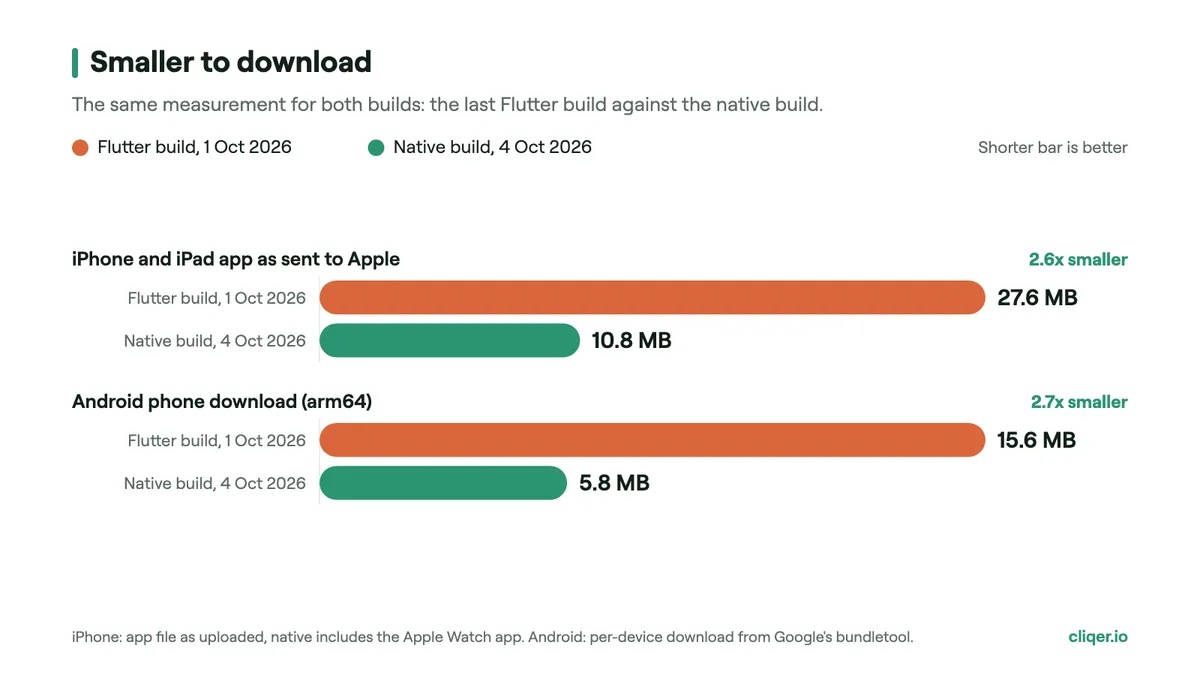
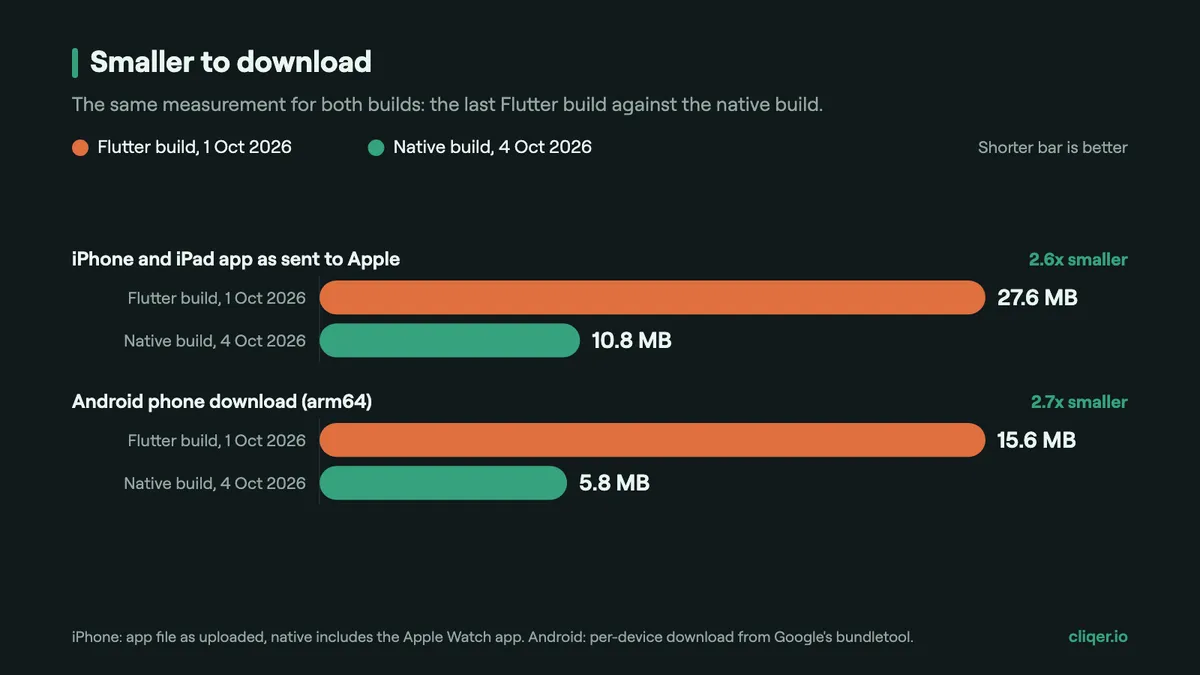
We measured both builds the same way. The iPhone app as uploaded to Apple went from 27.6 MB to 10.8 MB, and that is with the Apple Watch app (1.5 MB) inside it. The download for an Android phone, measured with Google's own bundle tool for the same 64-bit phone, went from 15.6 MB to 5.8 MB. About a third of the old size matters when someone installs the app on venue Wi-Fi with five minutes to go.
A faster phone app is only half of a click. The other half is the computer that runs the presentation, and while the apps were being rebuilt we went after that side too.
When a click reaches the Cliqer desktop app, it has to move the presentation and then tell everyone in the room which slide is showing. That second part used to ask the presentation app for its slide number after every click, and that question was slow.
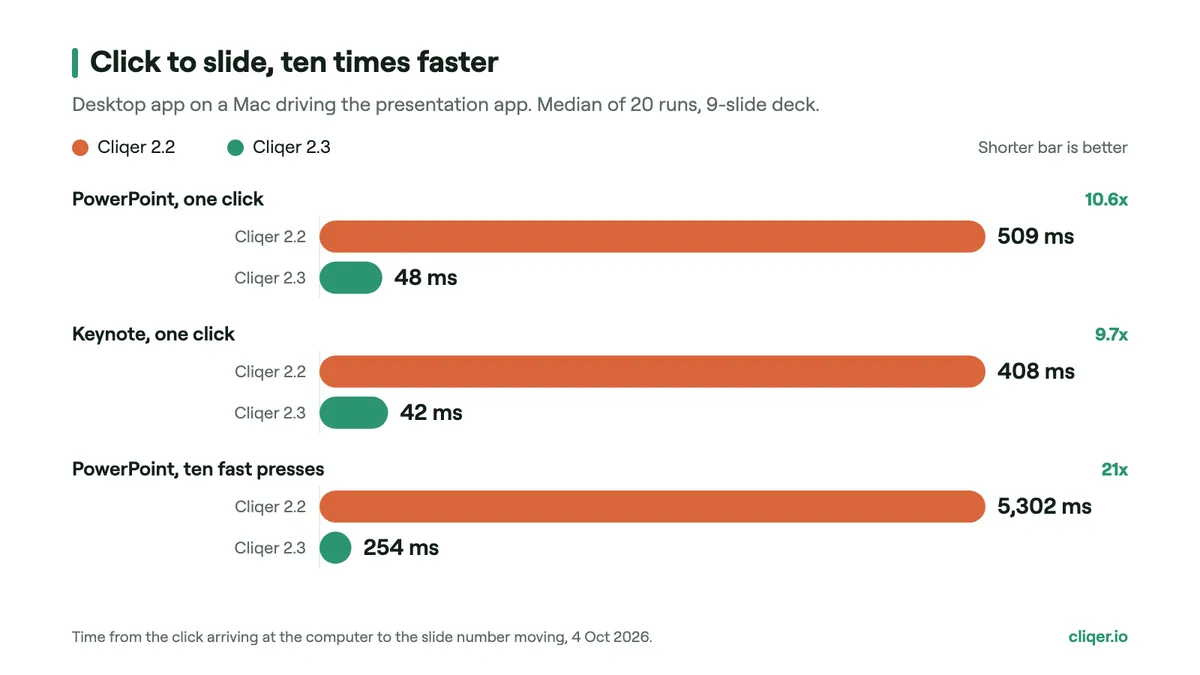
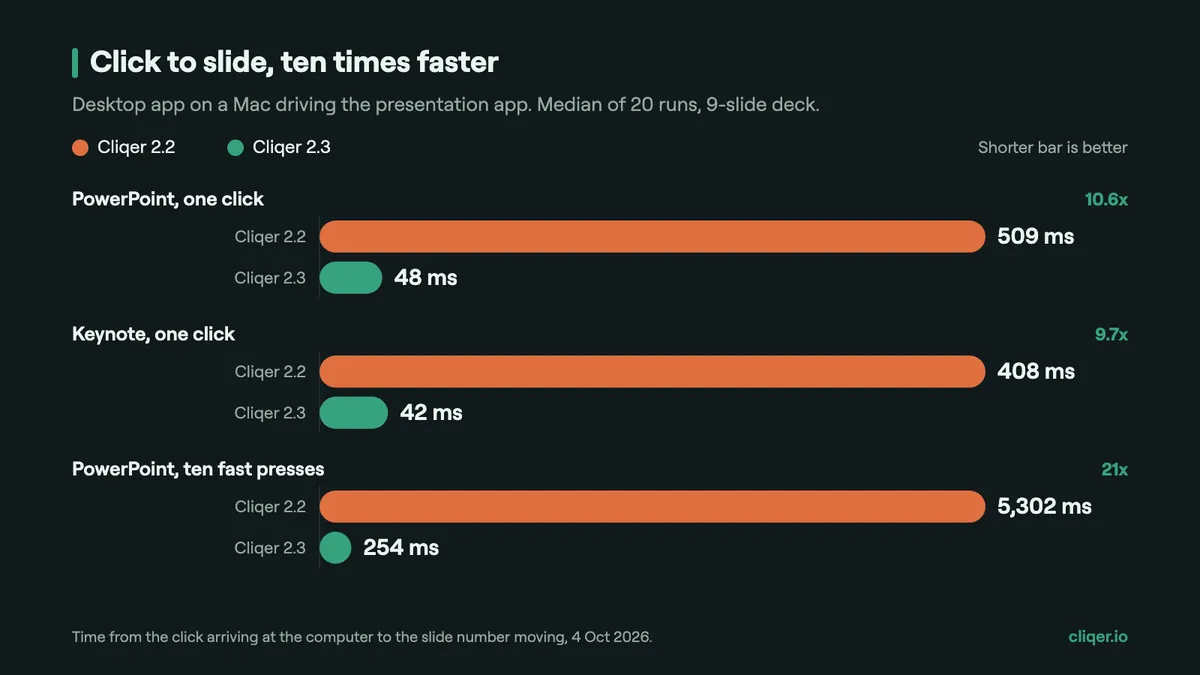
Cliqer 2.3 keeps one connection to PowerPoint or Keynote open and reads the position straight from the step it just took. On a Mac, over 20 runs, the median click to slide fell from 509 ms to 48 ms in PowerPoint and from 408 ms to 42 ms in Keynote. Ten fast presses, the kind a presenter makes to skip a section, used to take 5.3 seconds to settle. They now merge into one move and land in 254 ms.
Earlier this year we found why a shared screen could freeze for seconds on Wi-Fi. Screen video in Cliqer travels over a reliable data channel, and the standard that channel is built on waits at least one full second before resending a lost packet, doubling on each repeat. Chrome uses 400 ms. Every frame behind the lost one waited in line, the host then forced a full refresh into that same queue, and on a slow link it did that again and again.
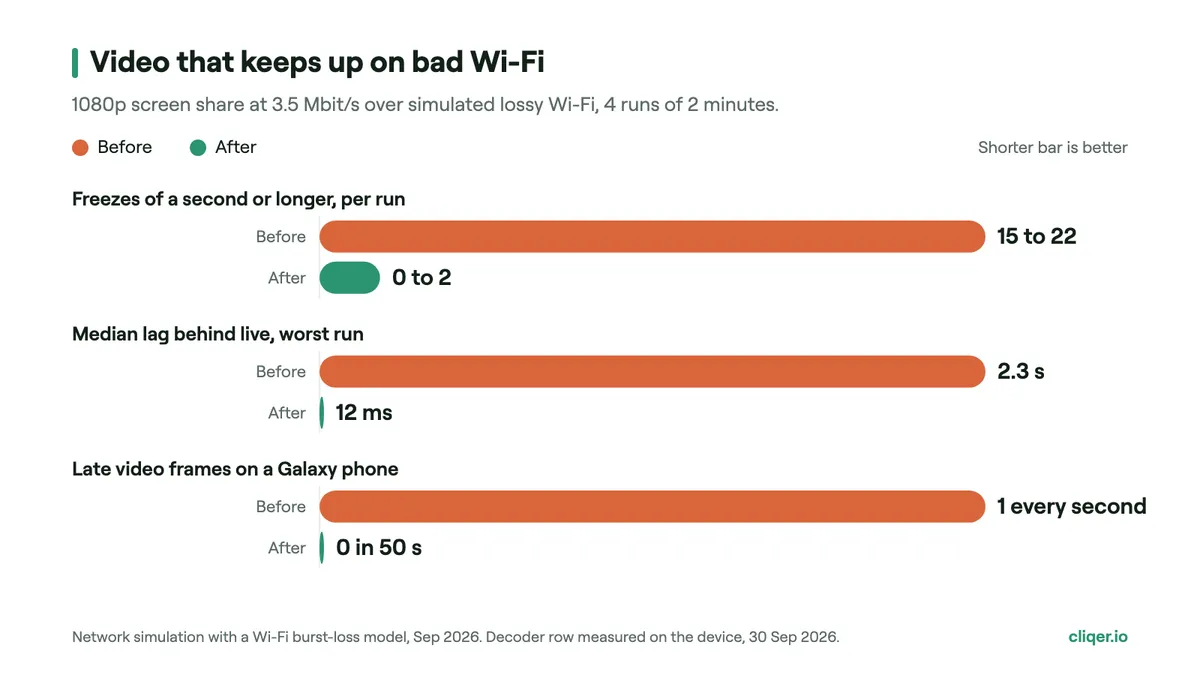
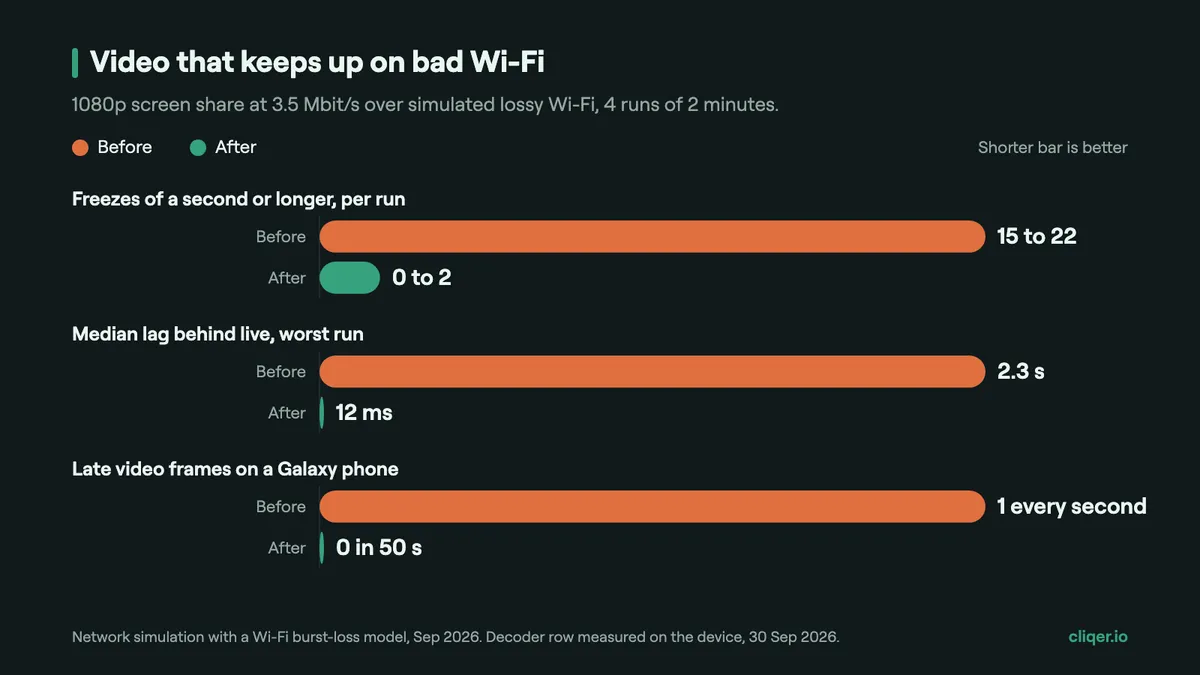
We tuned the resend timers to Chrome's values and stopped refreshes from queueing behind the backlog. In a network simulation with a Wi-Fi loss model, a 1080p share went from 15 to 22 freezes of a second or longer every two minutes to 0 to 2, and the median lag behind live from up to 2.3 seconds to 12 ms. We also capped full refreshes at one per stream every half second, because every one of them goes to every viewer: before that cap, a viewer could receive 19 full refreshes a second, about 40 Mbit/s.
On the phone side, the Galaxy's hardware video decoder held back one ordinary frame for about 60 ms, roughly once a second. Telling the decoder to run at full speed took that to zero late frames in 50 seconds. That fix ships in the native Android app.
If you build anything real-time on phones, these cost us days to learn and take minutes to apply:
Cliqer Remote is native on iPhone, iPad, Android, Apple Watch and Wear OS. Clicks are quicker, the phone stays cool and uses half the battery our first build did, the video is drawn the way the phone is designed to draw it, and the app is about a third of its old size. The web presenter still works in any browser with no install at all, so nobody in your room is ever left out.
Cliqer Remote shows live video, frosted glass and a clicker in a phone that sits in a presenter's hand for an hour. In the Flutter build the UI redrew for every video frame and every glass panel copied the whole screen each frame, which cost GPU time and heat on Android. Native apps draw video on a system layer by construction, and they came out at about a third of the download size.
In our test on a Galaxy S24+, ten minutes of live screen video warmed the phone by 0.2 °C with the native app, against 5.9 °C with our first Flutter build. The native app drew no interface frames while the video played and used 86 mAh of battery against 168 mAh.
No. Flutter got us to a full app on both stores in five days, and after our tuning the native app used only 25% less battery than it did. For most apps it is an excellent choice. Our app combines continuous live video, many blurred glass surfaces and long sessions on a warm phone, which is the case where its rendering model cost us the most.
It runs everything that is not drawing: joining and reconnecting to a room, receiving the shared screen, sending clicks, laser and ink, chat, notes, the timer, calls and pairing a phone with a computer. The iPhone and Android apps share it, so a fix lands on both at once.
On a Mac with Cliqer 2.3, the desktop app turns a click into a slide change in a median of 48 ms in PowerPoint and 42 ms in Keynote, measured over 20 runs. The network adds its own round trip on top, which in our relay tests had a median of 13 to 16 ms.
No. The web presenter works in any modern browser with no install. The apps add a native QR scanner, Face ID or biometrics for controlling the host, a screen that stays awake, and the Apple Watch and Wear OS clickers.
Keep reading


Practical guides for presenters, AV crews and event teams, plus the Cliqer releases that matter. No spam, one click to leave.